Async Meetings: How Remote Teams Run Them Effectively in 2026
By The Quely Team — Quely editorial team
Updated July 2026: We removed an unsupported universal meeting-cost estimate, added a primary source, and refreshed the workflow guidance for 2026.
I've been part of distributed teams for the better part of a decade, and I'll tell you what nobody wants to admit: most of our meetings are productivity killers masquerading as collaboration. But here's the thing: async meetings aren't just a nice-to-have for remote teams anymore. They're becoming the secret weapon that separates high-performing distributed teams from the ones still trapped in Zoom fatigue.
After studying how companies like GitLab, Zapier, and Basecamp have built entire cultures around asynchronous communication, I've distilled what really works into actionable strategies you can implement right now. Let's dive into why async meetings might be the productivity breakthrough your team needs.
What is an Async Meeting?
An async meeting is fundamentally different from the traditional conference room experience we've all grown tired of. Instead of demanding everyone's presence at a specific time, async meetings happen through recorded videos, shared documents, threaded discussions, and structured updates that team members engage with on their own schedule.
Think of it as the difference between a live TV broadcast and Netflix. Both deliver content, but one takes into consideration your time and attention span.
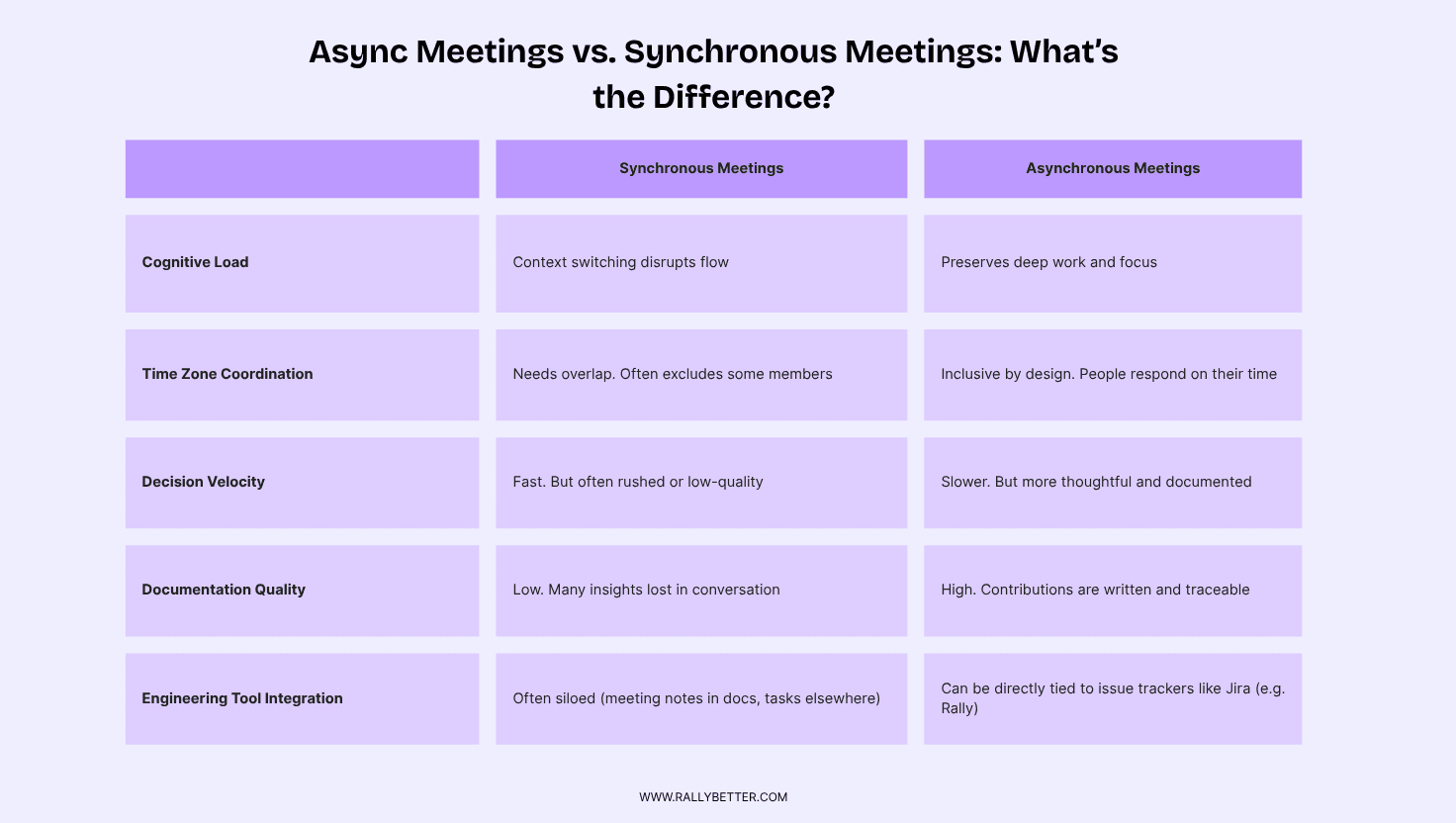
The core difference between async and sync meeting isn't just about timing. It's about intentionality. Synchronous meetings require immediate attention and real-time responses, often leading to hasty decisions and surface-level thinking. Asynchronous meetings on the other hand give participants time to process information, create thoughtful responses, and contribute meaningfully regardless of their time zone.
In summary, sync meetings optimize for speed, while async meetings optimize for quality.
Why Async Meetings Matter in 2026
The evidence does not show that every synchronous meeting is harmful. It shows that inefficient meeting load, fragmented attention, and excessive communication can disrupt productive work. The practical question is which interactions genuinely need live time.
1. Meeting overload has measurable consequences: Microsoft’s Work Trend Index identified inefficient meetings as the leading productivity disruptor in its survey and reported that respondents spent more time communicating than creating. Avoid universal cost-per-employee claims; calculate the cost from your own meeting hours, compensation, and interruption patterns.
Measure your own baseline: recurring meeting hours, attendance cost, decisions produced, follow-up work, and interruptions to focused work. That produces a defensible case for changing a specific meeting.
2. Productivity effects depend on implementation: Moving information-sharing out of live meetings may create more focus, but a poorly structured async process can add delay and rework. Run a pilot and compare meeting time, decision latency, unresolved blockers, and delivery outcomes.
The benefit comes from protecting attention and improving access to context, not from the label “async” alone. Teams still need clear response windows, accountable decision-makers, and an escalation path.
3. Time Zone Inequality : This hits close to home for anyone managing global teams. The typical meeting culture creates systematic bias toward certain time zones, effectively silencing voices based on geography or time zone. I've watched talented engineers become disengaged simply because they're always joining calls at inconvenient hours.
Async meetings can broaden participation across time zones when everyone receives the same source material, has enough time to respond, and can see how the final decision was made.
4. Burnout risk: Fewer unnecessary interruptions may support focus and work-life boundaries, but async communication can also create an always-on expectation. Define quiet hours, response windows, and what truly counts as urgent.
Well-designed asynchronous workflows can reduce meeting fatigue, broaden access to context, and improve decision traceability. They should complement rather than categorically replace synchronous collaboration.
5. Inclusivity and Equal Participation: Traditional meetings favor the loudest voices and fastest thinkers. Asynchronous meetings level the playing field by giving everyone equal space to contribute. Introverts who rarely speak up in real-time suddenly become valuable contributors when they can process and respond thoughtfully.
I've watched quiet team members become key voices in async environments because the format plays to their strengths rather than penalizing their communication style.
When Should You Use Async Meetings?
This is where most teams stumble. They find it hard to know when async actually serves the work better than real-time meeting. After years working in distributed teams, I've developed what I call the "async decision matrix" based on three important factors.
The Three-Factor Decision Framework
Factor 1: Information Complexity vs. Processing Time Needed
Here's the counterintuitive truth: complex topics often work better async, not worse. When GitLab needs to make architectural decisions, they don't schedule a 2-hour sync meeting. They create detailed proposals that engineering leads can digest over several days, research implications, and provide thoughtful feedback.
The rule I've learned: if someone needs more than 5 minutes to fully understand the context, or if the decision impacts multiple systems/teams, async wins. People make better technical decisions when they have time to think, not when they're put on the spot.
Factor 2: Stakeholder Distribution and Urgency
If your decision-makers span more than 6 hours of time zones, sync meetings systematically exclude someone. I've watched critical architectural decisions get made with half the senior engineers missing because the meeting was scheduled for San Francisco convenience.
But here's the nuance: urgency doesn't automatically mean sync. Real urgency—production down, security breach, customer-facing bug—yes, get on a call immediately. Perceived urgency like "we need to decide this sprint's priorities" can almost always wait 24-48 hours for thoughtful async input.
Factor 3: Team Async Maturity Level
This is the factor most articles ignore: your team's readiness for async collaboration. Teams new to remote work often need more sync touchpoints initially because they haven't developed async communication skills yet.
I typically see a 3-stage progression:
Stage 1: Heavy sync with async supplements
Stage 2: Async-first with sync for exceptions
Stage 3: Async-native with strategic sync moments
When Async Meetings Work Best
1. Status Updates and Progress Reports: This should be obvious, but it's worth emphasizing: if you're just sharing information that doesn't require immediate response, async eliminates the coordination overhead entirely.
2. Technical Decision-Making: Counterintuitively, complex technical decisions often improve with async processing. When Zapier evaluates new architecture patterns, they don't brainstorm in real-time. Engineers write detailed proposals, others review and comment asynchronously, and the final decision is often better because people had time to research and think.
3. Cross-Timezone Collaboration: Any decision that affects global team members should default to async unless there's compelling reason otherwise. I've seen too many "quick sync meetings" that exclude half the relevant expertise simply due to time zone convenience.
4. Retrospectives and Planning : Private reflection before sharing can give people more time to form a response and may reduce pressure to follow the first opinion voiced. Whether that improves a retrospective should be checked through the team's own feedback and follow-through rate.
When to Stick with Synchronous Meeting
1. Rapid Iteration Problem-Solving: When you need to bounce ideas quickly and build on each other's thinking in real-time, sync wins. This is especially true for debugging complex issues where the solution emerges through rapid back-and-forth.
2. Emotional or Sensitive Conversations: Performance feedback, conflict resolution, or strategic pivots that affect job security need the nuance of real-time interaction. You need to read faces and adjust your communication based on emotional responses.
3. Creative Brainstorming: While async can work for structured ideation, the energy and momentum of live brainstorming often produces breakthrough insights that wouldn't emerge through asynchronous threads.
4. Crisis Management : True emergencies require real-time coordination. But be honest about what constitutes a crisis. Most "urgent" issues are actually important decisions that benefit from reflection time.
The Gray Areas (Where Teams Usually Struggle)
1. Project Kickoffs: Teams often default to big sync meetings, but I've seen better results with hybrid approaches: async context-setting followed by focused sync alignment sessions.
2. Technical Reviews: Code reviews work beautifully async, but architectural reviews often benefit from real-time discussion after async preparation.
3. Client Presentations: The presentation might be sync, but the preparation and post-meeting follow-up almost always work better async.
Testing Your Async Readiness
Before committing to async for any given scenario, ask these diagnostic questions:
Can this decision be explained clearly in writing? If not, the thinking might not be clear enough yet.
Do stakeholders need immediate clarification to contribute meaningfully? If yes, consider sync.
Would a 24-48 hour delay meaningfully impact the outcome? If no, default to async.
Does this require reading emotional subtext or building energy? If yes, lean toward sync.
The goal isn't to maximize async meetings. It's to use each format where it creates the most value. Teams that succeed with asynchronous meetings are ruthlessly honest about these trade-offs rather than defaulting to either extreme.
How to Plan an Effective Async Meetings
I've been in more async "meetings" that felt like digital tumbleweeds than I care to count. You know the ones—someone drops a question into Slack, gets three emoji reactions, and calls it collaboration. The problem isn't that async meetings are broken; it's that most teams are running them like they're just delayed conference calls. The teams that actually make async work? They've figured out it's a completely different discipline.
1. Front-load the preparation: The organizer should assemble the problem, evidence, constraints, options, and decision request before inviting responses.
I learned this the hard way leading a distributed platform team. I'd drop a problem into our async thread "How should we handle the rate limiting issue?" and watch seven engineers spend the next two days rediscovering the same context I already had. We were burning collective cycles on information gathering instead of decision-making.
Now I structure it differently. Before asking for input, I document:
What I've already tried or ruled out (and why)
The specific trade-offs I'm wrestling with
The 2-3 viable paths I see, with my preliminary thinking on each
This isn't about providing answers. I's about giving people a foundation to build on rather than starting from scratch.
2. Design for Response Quality, Not Participation: Here's what I see constantly: teams optimizing for "everyone weighs in" instead of "the right people weigh in with depth."
The most effective async meetings I've participated in use graduated engagement levels:
Core decision-makers: Full position with technical reasoning
Domain experts: Flag risks or build on technical approach
Stakeholders: Confirm no major objections
When our team was evaluating a messaging architecture change, our lead architect gave a full technical breakdown, our SRE flagged operational concerns, and our PM confirmed it aligned with user needs. Three focused responses versus fifteen "looks good to me" comments.
The key is being explicit about what kind of thinking you need from each person.
3. Build Context Into Your Workflow, Not Around It: The teams doing this well aren't treating async meetings as separate from their work—they're embedding them directly into their existing workflow.
We started pulling our technical discussions directly from our monitoring alerts and issue tracking. When our error rates spiked, the async meeting thread automatically included the relevant dashboards, recent changes, and past incident notes. People could jump straight into diagnosis instead of hunting for context.
Quely keeps asynchronous review grounded in actual work. Jira issues and other execution objects can enter a Space as Work Units, alongside the Context Units and Signals people need to understand them.
4. Know When to Kill the Thread: The most underrated skill in async facilitation: recognizing when the format isn't working.
I now build circuit breakers into complex technical decisions. If we're not converging after 48 hours or if the thread spawns three different sub-discussions, I escalate to a sync call with the core people.
When an asynchronous thread reveals a decision that genuinely needs live discussion, escalate deliberately: name the unresolved question, invite only the decision-makers, share the relevant context in advance, and record the outcome afterward.
The goal isn't to avoid synchronous collaboration—it's to use async strategically for the thinking work, then sync for rapid convergence.
How GitLab and Zapier Master Async Meetings
Let me share what I've learned from studying these companies' approaches. They're not just using different tools. They're operating from fundamentally different assumptions about how work gets done.
GitLab's Handbook First Culture
GitLab treats documentation like most companies treat meetings: as the primary vehicle for alignment and decision-making. Their handbook-first approach means that by the time something becomes a discussion, the context and background are already crystal clear.
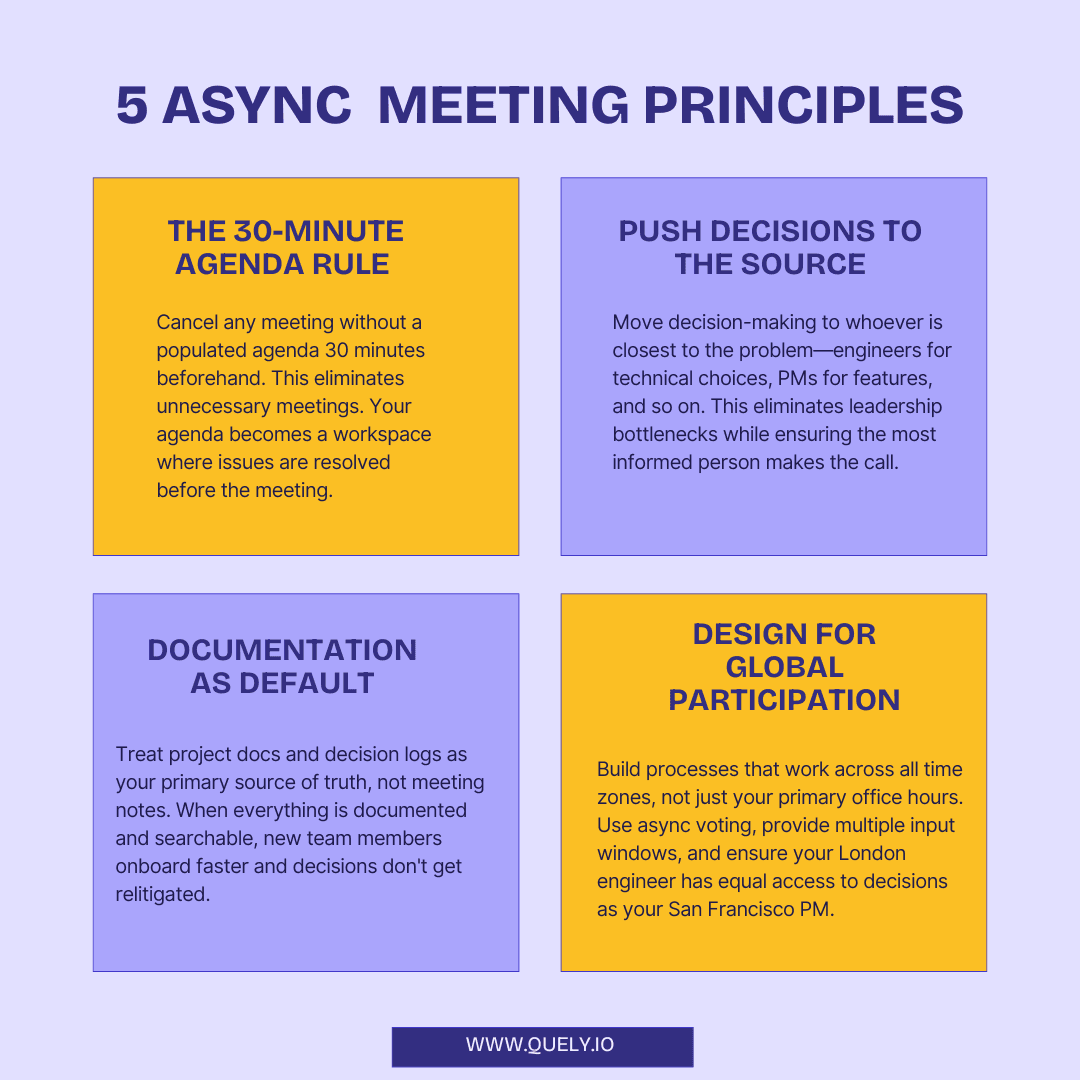
What impressed me most: they cancel meetings if the agenda isn't populated 30 minutes beforehand. This simple rule forces intentionality and respects everyone's time.
Their live editable agendas create collaborative preparation that often eliminates the need for the meeting entirely. When people can contribute to the agenda asynchronously, the actual synchronous time becomes much more focused and valuable.
Key Practices:
All processes documented in centralized handbook
Required shared agendas. Empty agenda = canceled meeting
Optional participation with recordings for inclusivity
Decentralized decision-making by those closest to the issue
Rotating meeting times for global team equity
Zapier's Automated Excellence
Zapier has mastered the art of automated standups that maintain team alignment without coordination overhead. They use their own platform to connect Slack, Asana, and other tools, creating workflows that surface the right information at the right time.
Their video update culture is particularly smart. Instead of scheduling meetings for demos or explanations, team members record short videos that others can consume and respond to asynchronously. This asynchronous daily standup approach maintains transparency while protecting deep work time.
Key Practices:
Video updates replace scheduled demo meetings
Automated standups through integrated tools
Separate channels for urgent issues to prevent blocking
Clear accountability through project tracking tools
Best Practices to Run Async Meetings Smoothly
Asynchronous meetings are transforming how remote and distributed teams collaborate. Unlike traditional synchronous meetings, async meetings allow team members to participate on their own schedule while maintaining alignment and productivity. Here's your comprehensive guide to mastering this approach.
Conclusion
Effective remote teams cancel meetings that have no decision to make, move context-sharing into writing, and give people across time zones an equal chance to contribute. Quely supports that model by connecting Work Units with synthesized Context Units. Orbit surfaces questions, decisions, dependencies, blockers, risks, and action items as Signals, while Ownership makes responsibility explicit. The result is not “no meetings”; it is fewer meetings used for the decisions that genuinely require live attention.
Related reading: Anticipate common challenges of asynchronous work.