What Is Asynchronous Work? The Ultimate Guide to Going Async
By The Quely Team — Quely editorial team
I've watched too many engineering teams burn out from meeting fatigue. Daily standups that drag on, "quick syncs" that interfere with deep work, and the constant ping of Slack messages that demand immediate responses. If you're leading a distributed team, you've probably felt this too.
Asynchronous work isn't just a buzzword. It's a fundamental shift in how we collaborate, especially for teams spread across time zones. When done right, it gives you long blocks of focused uninterrupted work you want while maintaining the collaboration and alignment your team needs.
Companies such as Doist, Gumroad, and Buffer have documented remote or asynchronous operating practices. Their examples show that teams can ship without requiring everyone to be online simultaneously, but they do not prove that async work alone causes commercial success.
But here's the thing: transitioning to asynchronous work isn't just about getting on Slack and calling it a day. It requires intentional process changes, the right tools, and most importantly, a cultural shift from synchronous thinking to async-first mindsets.
So in this article, I'll walk you through the strategies, tools, and frameworks that successful teams use to master async work.
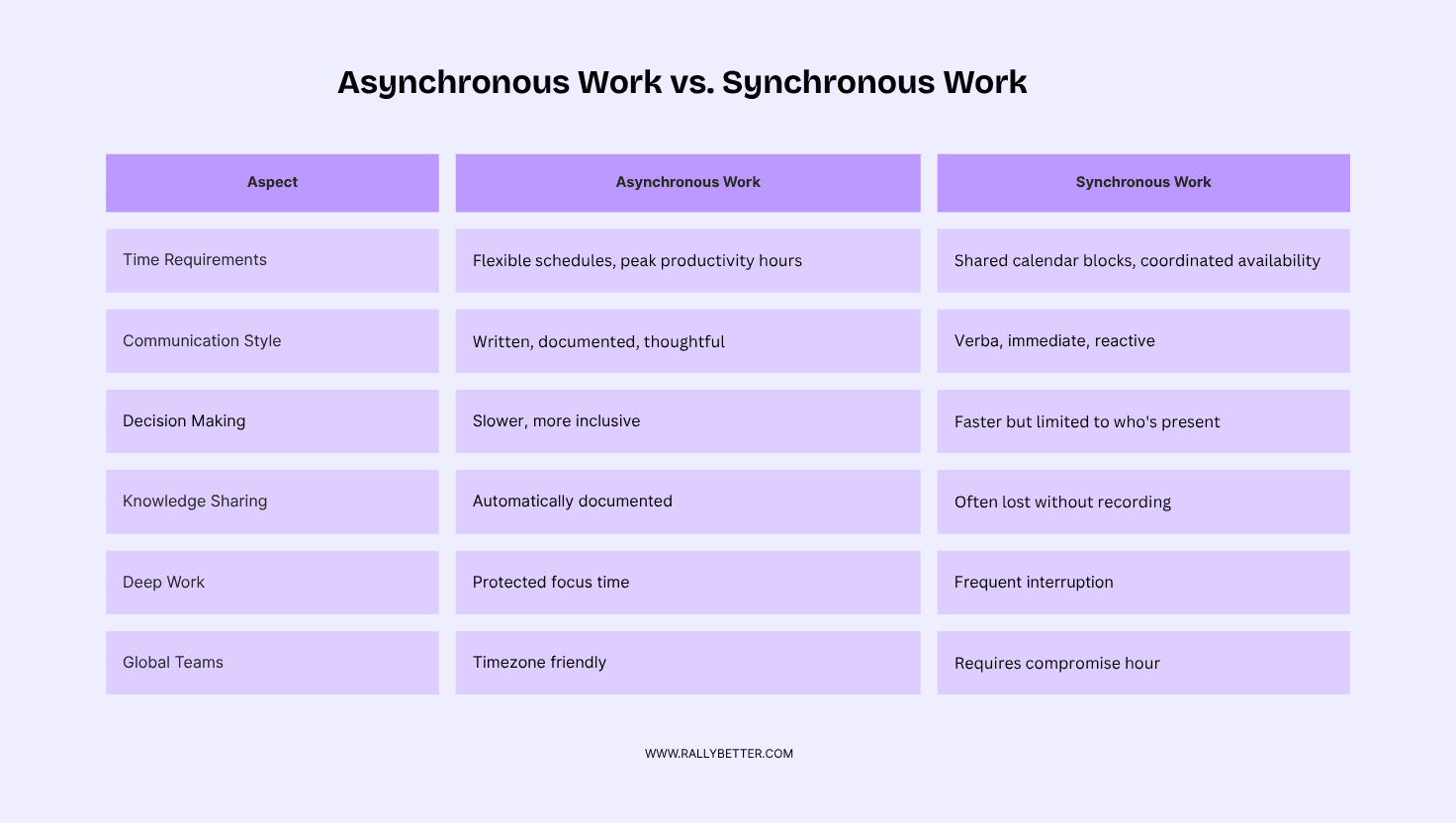
Asynchronous Work vs. Synchronous Work
Asynchronous work means team members contribute to projects without needing to be online simultaneously. Communication happens through written messages, documented decisions, and shared artifacts that are accessible over time. Think pull requests, design specs in Figma, or detailed project briefs.
Synchronous work requires real-time interaction. Everyone needs to be present, whether that's a Zoom call, pair programming session, or standing around a whiteboard. The collaboration happens in the moment.
Top Benefits of Asynchronous Work
1. Enhanced Focus and Deep Work: The most immediate benefit you'll notice is the return of uninterrupted coding time. When your team isn't context-switching between meetings every 30 minutes, they can tackle complex problems that require sustained concentration.
I've seen backend engineers solve architecture challenges in a few hours of morning focus time that would have taken days of fragmented afternoon sessions. Asynchronous work protects these golden hours by batching communication into dedicated review periods.
2. Flexibility and Autonomy: Asynchronous work means your night-owl developer can push code at 11 PM, while your early bird can review it at 6 AM. Both contribute when they're most productive, without forcing anyone into a schedule that impededes their productivity.
This flexibility becomes critical when you're hiring globally. Your best Android developer might be in Eastern Europe, your designer in South America, and your product manager in San Francisco. Asynchronous work makes this distributed talent accessible without requiring anyone to work odd hours.
3. Reduced Zoom Fatigue: Meeting fatigue is real, especially for engineers who prefer written communication over video calls. Asynchronous work reduces meeting overhead by making most discussions happen in context, directly in code reviews, design files, or project documentation.
How to Transition to Asynchronous Work
Step 1: Start Small with a Pilot Project
Don't attempt to flip your entire organization overnight. I've seen teams try this and fail spectacularly. Instead, choose a project, maybe a feature that involves 3-4 people across different time zones.
Buffer took this approach when testing their 4-day work week, starting with a one-month trial before expanding. When they experimented with asynchronous work in Q4 2024, they canceled recurring meetings for specific projects rather than company-wide.
For your pilot, try eliminating daily standups for one sprint. Replace them with async updates in your project management tool. Team members post their progress, blockers, and next steps in writing. You'll quickly identify what works and what needs refinement.
Step 2: Set Clear Expectations & Response Times
Asynchronous work doesn't mean "respond whenever you feel like it." Clear expectations prevent anxiety and keep projects moving.
Establish response time guidelines based on urgency:
Critical production issues: 2 hours maximum
Code review feedback: 24 hours for initial review
Design feedback: 48 hours for comprehensive critique
Project planning input: 72 hours for strategic decisions
These timelines give people breathing room while maintaining project momentum. Record the feedback window in the team’s source system and keep it visible alongside the relevant work so everyone knows when input is expected.
Step 3: Invest in the Right Communication Tools
Your tool stack becomes critical in asynchronous work. Each tool should serve a specific purpose:
Slack or Discord: Quick updates, social connection, urgent communications
Jira or Linear: Task management, project tracking, sprint planning
Notion or Confluence: Documentation, project briefs, team handbooks
Figma: Design collaboration, visual feedback, prototyping
Quely: Cross-system intelligence for connected work and context
Loom: Screen recordings for complex explanations
The key is establishing clear protocols. A team might use Slack for daily updates, Quely to connect work with context across systems, and Notion for detailed project specifications. When everyone knows which tool serves which purpose, communication becomes more efficient.
Step 4: Build a Culture of Documentation
This is where most teams struggle. Synchronous teams often rely on tribal knowledge, information trapped in people's heads or scattered across random Slack threads. Asynchronous work demands that knowledge be accessible and searchable.
Start with a handbook in Notion or Confluence. Include:
Onboarding checklists for new team members
Architecture decisions with reasoning documented
API documentation that stays current
Deployment procedures that anyone can follow
Meeting summaries when sync sessions do occur
Encourage "memo-first" thinking. Before scheduling a meeting, ask if the discussion could happen asynchronously through a detailed written proposal. You'd be surprised how often the answer is yes.
Step 5: Foster Trust and Autonomy
Asynchronous work only works with high trust. Micromanagement becomes impossible when people work different hours, which is actually a feature, not a bug.
Focus on outcomes rather than activity. Judge your developers by the quality of their code, not the hours they're online. Give people the freedom to structure their day around their peak productivity times.
One designer I worked with did their best creative work between 10 PM and 2 AM, then handled feedback and meetings the following afternoon. Their output improved dramatically once we stopped forcing them into a 9-5 schedule.
Step 6: Maintain Human Connection (Sync Touchpoints)
Asynchronous work doesn't mean never talking to your teammates. Strategic synchronous moments become more valuable, not less.
Buffer maintained monthly 1:1s during their async experiments. These conversations focused on career development, goal alignment, and relationship building—things that benefit from real-time interaction.
Consider preserving:
Weekly team retrospectives for process improvement
Monthly all-hands for company updates and culture
Quarterly planning sessions for strategic alignment
Impromptu pair programming when complex debugging is needed
Tools That Power Asynchronous Collaboration
The modern async work stack isn't just about tools. It's about understanding how our brains handle information. Most development teams now work across multiple time zones, and the key to success is in choosing tools that match how we naturally think and process information. Here are some leading tools for async work and how they use psychology to improve team performance
1. Slack has evolved beyond basic messaging into what researchers call "ambient awareness", staying connected to your team without constant checking.¹ The secret is in simple channel naming that matches how we naturally think. Top async work teams use clear prefixes like #decision-, #update-, and #social- to help brains process information faster.
2. Notion is the "external brain" for async work teams. Its AI-powered templates learn from how your team communicates, then automatically organize information to match your thinking patterns.
3. Jira's value is beyond project tracking. It also gives distributed teams a visible record of progress when people are not online at the same time. The GitLab all-remote handbook is a useful primary example of written, handbook-first operating practices. Use your own delivery and team-feedback data to judge whether automated updates reduce uncertainty.
4. Quely reduces context switching by connecting execution systems with the decisions, discussions, documents, and historical activity around the work. Jira issues and other tasks become Work Units inside Spaces; Orbit reasons across those Units and their context to surface questions, risks, dependencies, blockers, and missing information as Signals.
5. Loom solves the empathy problem in async work. Screen recordings include tone, pace, and visual cues that text misses, creating what researchers call "presence bleed," where async communication feels more personal and immediate.³
Examples of Companies that Have Mastered Async Work
These companies prove async work isn't just possible, it's profitable. Here's how they built successful businesses around asynchronous collaboration.
1. How Doist Uses Async Work
Doist has operated as a remote-first, async work company since its founding. CEO Amir Salihefendic made asynchronous communication the default, not the backup plan.
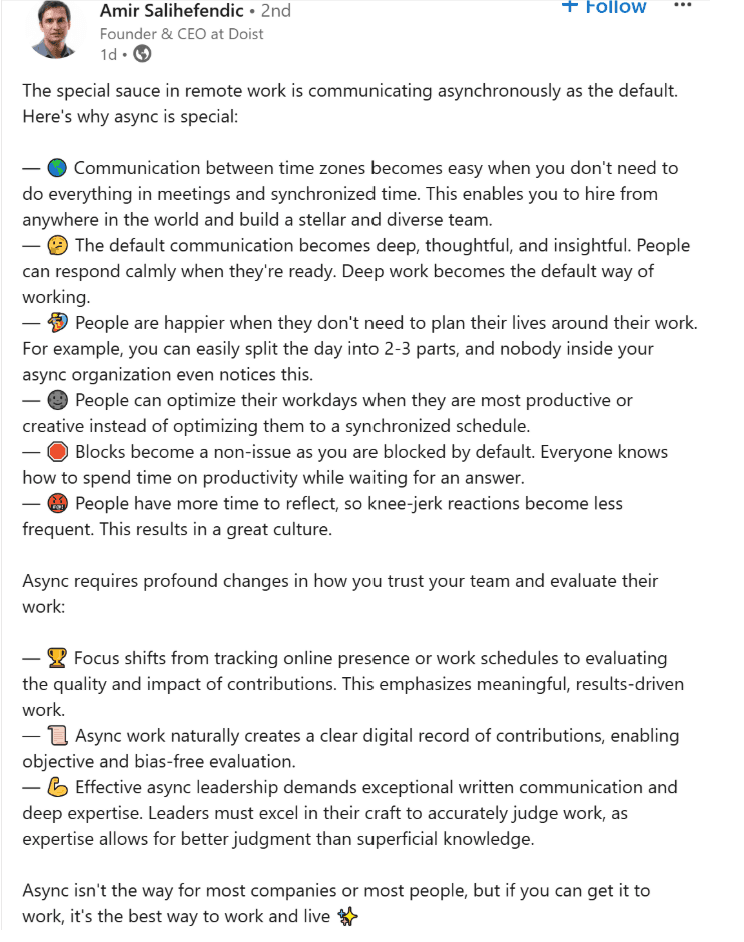
Public descriptions of the approach emphasize:
Fewer recurring meetings and more written communication
Hiring across countries and time zones
Longer blocks of focused work
Written-first decision making using Twist (their own async communication tool)
The psychology behind their success: written communication forces clearer thinking. When you can't interrupt or rush someone, ideas become more thoughtful.
Their async work stack: Twist for communication, Todoist for task management, and Notion for documentation, proving that a minimalist tool selection beats feature bloat.
2. Gumroad’s Async Work Transformation
Sahil Lavingia rebuilt Gumroad as an async-first company after nearly shutting down. His key insight: asynchronous collaboration leads to better decisions because people process information before responding.
Gumroad's async work practices include:
Memo-driven culture - every decision documented before discussion
Asynchronous code reviews that prioritize quality over speed
Documentation-heavy workflows that preserve institutional knowledge
Flexible schedules across 12 time zones without coordination overhead
The important operating lesson is not a historical revenue figure. It is that Gumroad documented decisions, used asynchronous reviews, and kept the team structure lean. Commercial results can change and cannot be attributed to one work practice alone.
Their async work challenge: maintaining creativity and innovation without spontaneous brainstorming. Solution: structured "async innovation sessions" using Miro and Loom for idea sharing.
3. Buffer's Bold Async Work Transformation: Cancelling All Meetings
In 2024, Buffer took a comprehensive approach to async work by cancelling all recurring meetings company-wide. Their "Deep Work Quarter" experiment demonstrates how organizations can make decisive shifts toward asynchronous collaboration.
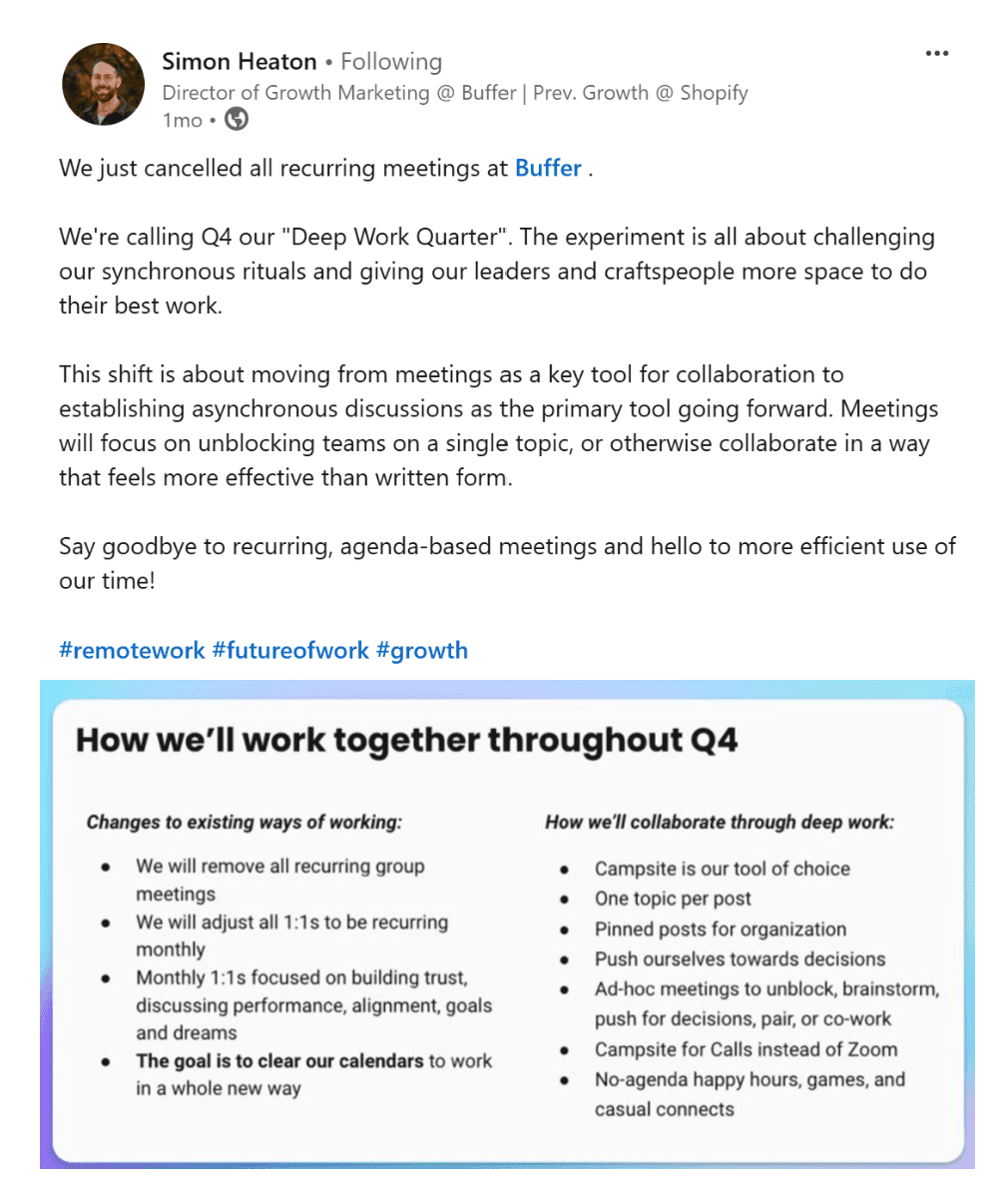
Buffer's all-in async work approach:
Complete meeting elimination - removed every recurring group meeting from calendars
Monthly 1:1s only - focused on trust-building, performance, and goal alignment
Campsite as primary tool - structured async discussions with one topic per post
Ad-hoc meetings reserved for specific needs - unblocking, brainstorming, or urgent decisions only
The psychology behind the bold move: Director of Growth Marketing Simon Heaton explained that the reason for this is to move "from meetings as a key tool for collaboration to establishing asynchronous discussions as the primary tool going forward."
Their async work structure includes pinned posts for organization and a clear rule that meetings only happen when written communication isn't effective. This created what they call "efficient use of our time" while giving leaders and craftspeople more space for deep work.
The experiment's most interesting aspect: rather than gradual adoption, Buffer committed fully to async work principles, proving that dramatic organizational change is possible when leadership commits completely.
Lessons from These Async Work Success Stories
These companies reveal important patterns for async work implementation:
Choose fewer, connected tools - Having 3-5 tools that share information smoothly works better than 10 separate systems that don't communicate
Priority on clear writing - Since async work relies heavily on written communication, unclear messages create project delays and confusion
Track results, not hours worked - Buffer measures project completion and quality, not who's online when
Write everything down - All three companies document decisions so team members can understand context and reasoning later
Best Practices to Help You Succeed with Async Work
1. Use of Templates, Memos, and Shared Docs
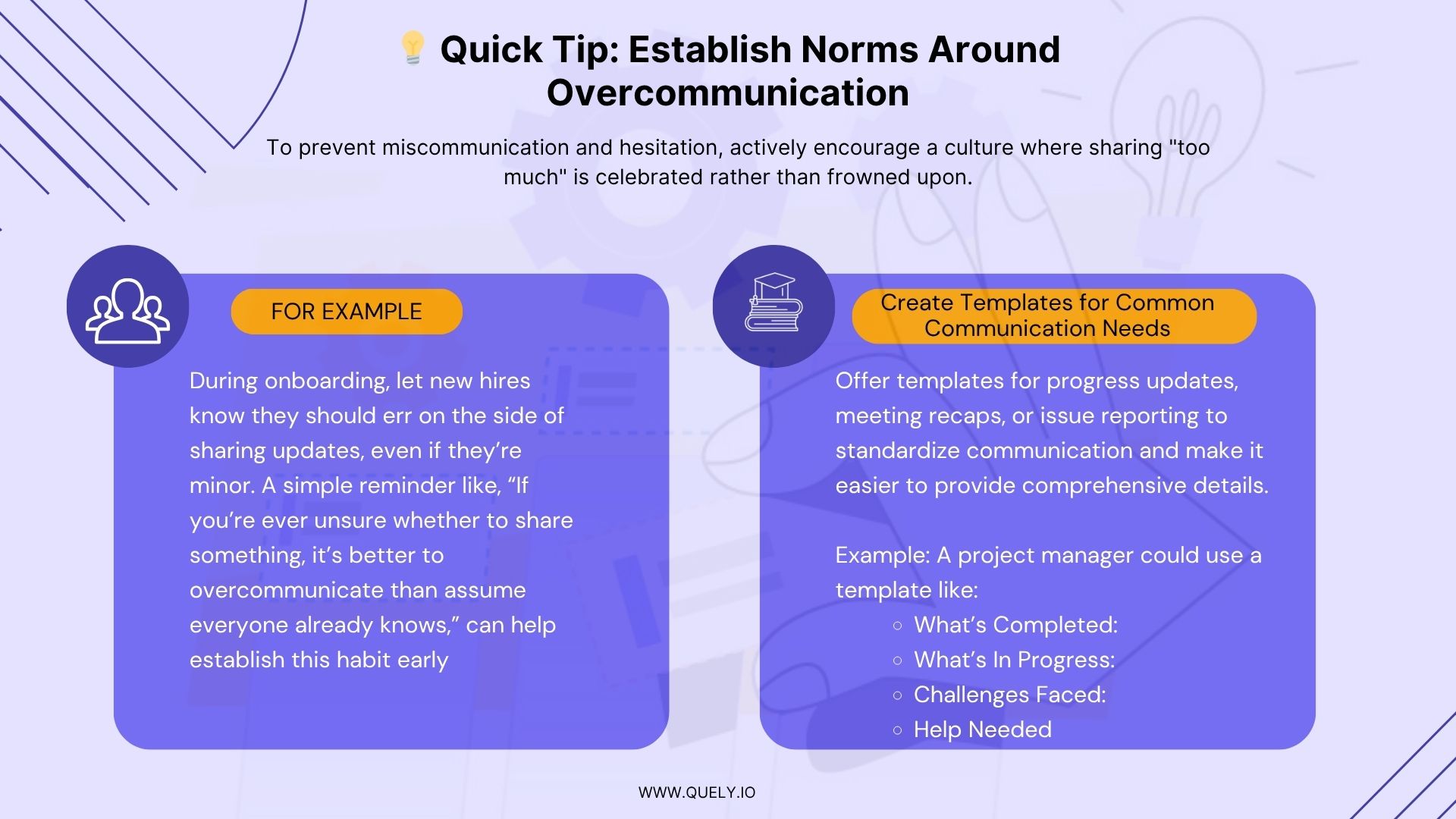
Consistency accelerates asynchronous work. When everyone uses the same templates for project briefs, code reviews, and status updates, communication becomes more efficient and searchable.
Create templates for:
Project kickoff memos with context, goals, and success criteria
Weekly status updates with progress, blockers, and next steps
Technical design docs with problem statement, proposed solution, and alternatives considered
Code review checklists with security, performance, and maintainability criteria
2. Overcommunication and Transparency
In asynchronous work, err on the side of sharing too much rather than too little. Without spontaneous Slack check-ins and impromptu video calls, information needs to be deliberately shared.
Maintain transparency through:
Public-by-default channels where appropriate
Decision logs that explain the reasoning behind choices
Regular updates on project status and company direction
Open calendars so people know when colleagues are available
Conclusion
Async work delivers what every engineering leader wants: developers with 6+ hours of uninterrupted focus time, global talent without time zone constraints, and decisions that improve because people have time to think before responding.
Yet most teams fail at async work. Why? Because when critical decisions happen in Slack threads that get buried, when context dies with whoever was online that day, and when your best developers waste hours reconstructing conversations just to understand a simple task, async work becomes more painful than the meetings it replaced.
Quely creates an intelligence layer across the systems teams already use, turning fragmented information into connected understanding.
Work from Jira and other execution systems becomes Work Units, while decisions, discussions, documents, and other organizational knowledge can contribute Context Units inside Spaces. Orbit reasons across those Units to surface questions, risks, dependencies, blockers, and missing context as Signals.
For distributed teams, this supports async work without forcing every conversation into one tool or another meeting. Ownership keeps responsibility, commitments, workload, and available capacity visible so people can act on what the team has learned.