Top 4 Asynchronous Collaboration Tools for Remote and Distributed Teams
By The Quely Team — Quely editorial team
As a distributed team, one of your major goals is to cut down meeting time (which doesn't work for everyone given the time-zone difference) and still remain aligned regardless of location. To achieve this, you need to cut down on meetings and move to asynchronous collaboration tools. In this article, we've complied the top four async work tools remote and distributed teams rely on to collaborate and align. We didn’t come up with these recommendations ourselves. We dug into sites like Reddit and LinkedIn and compiled all the recommendations we could find. So, here is it.
How We Compiled This List
Most lists of asynchronous collaboration work tools are basic compilations of tool descriptions and features. While helpful, they don’t tell you how real teams use these tools or what people love (or hate) about them. We took a different approach. We explored user-generated content (UGC) from platforms like Reddit and blogs to understand how distributed teams like yours actually use these tools. We focused on making it practical and actionable: how these tools fit into workflows, the problems they solve, and why the team loves them.
Top Asynchronous Collaboration Tools Distributed Team Use to Stay Connected and Productive
1. Quely: You know how difficult it can be to balance collaboration across time zones, without multiple meetings. You may be familiar with any or all of the problems below:
Difficulties hosting collaborative estimation: Without real-time discussions, it’s easy for team members to misjudge the effort required for tasks.
Planning across time zones: Syncing schedules for planning meetings can feel impossible, often leading to incomplete participation.
Fragmented Async Communication: Conversations scattered across tools make it hard to stay aligned and focused on goals.
Solution: How Quely Helps Distributed Teams Work Better
Quely is an intelligence layer across the systems distributed teams already use. It helps people recover the work, context, decisions, and open Signals they need without making another meeting the default.
Spaces for asynchronous review: A Space organizes related Work Units and Context Units so colleagues in different time zones can recover the same context on their own schedules.
Orbit for contextual review: Orbit reasons across connected Units and surfaces questions, dependencies, risks, blockers, and assumptions as Signals. Teams can review those Signals before an estimation or commitment conversation.
Context Units for continuity: Quely synthesizes relevant understanding from connected systems so decisions and prior discussions can remain tied to the work they affect.
Signals for focused attention: Decisions, questions, risks, opportunities, action items, dependencies, blockers, assumptions, commitments, and themes are explicit Signals, making it easier to focus on what requires action.
Ownership for execution context: Ownership brings responsibility, current commitments, workload, and available capacity into the same view so teams can discuss overload before assigning more work.
Practical use: Teams can apply this model to sprint planning, daily updates, project reviews, and other workflows where people need shared context without another status meeting.
Takeaway: Managing a distributed team should not require a meeting for every context transfer. Quely helps make work, context, Signals, and Ownership available asynchronously.
How to Apply This in Your Team
Start with one decision workflow: Choose a recurring planning or review process where missing context creates unnecessary meetings.
Create a Space: Connect the relevant Work Units and Context Units around that workflow.
Review Signals: Use Orbit to surface the questions, decisions, dependencies, blockers, and assumptions that need attention.
Check Ownership: Review responsibility, commitments, workload, and available capacity before assigning additional work.
The aim is a workflow where every participant can recover the same context and understand what requires action, regardless of location.
2. Loom: I used Loom a few hours before writing this article. I’d used it to record a quick run-through for a teammate. Interestingly, it was supposed to be a meeting, but we canceled at the last minute, and I used Loom instead. That's one of the benefits of asynchronous communication tools. Who better to hear how to use Loom for Async work than Loom themselves?
What’s most interesting about how Loom uses Loom (I know. I love the play on words 😀) for async all-hands is that it doesn’t cancel out meetings, just like most critiques of async work claim.
The Problem Loom faced was Juggling Time Zones and Engagement in All-Hands Meetings.
As they grew into a distributed team spanning multiple time zones, their traditional all-hands meetings started to fall apart. For one, finding a single time that worked for everyone was nearly impossible. While some team members were beginning their day, others were wrapping up or worse, tuning in during what should have been personal or family time.
This conflicting schedules led to half-hearted attendance and engagement. Even when people managed to join, they were distracted or unable to focus on the updates . On top of that, the format was limiting. Presenters were speaking into the void, and the asynchronous team dynamic left little room for the real-time energy and interaction that makes meetings impactful. Loom recognized that this approach was inefficient and counterproductive, and was not meeting the needs of their distributed team.
The Solution: Combining the Best of Async and Synchronous Meeting
To solve these challenges, Loom leaned into their async collaboration tool: recorded Loom videos. Instead of hosting lengthy live sessions, presenters created bite-sized updates—no longer than two minutes each that team mates can watch at their own time. This change turned Loom’s all-hands into an asynchronous meeting where everyone could participate regardless of their time zone.
But they didn’t stop there. Loom transformed how they used synchronous time. The company kept the live component but reserved it for Q&A and discussions, making these moments more intentional and valuable. Team members could react to videos with emojis, leave comments, and come prepared with thoughtful questions for the live sessions.
This shift allowed the team to keep the spirit of connection while eliminating the stress and inefficiency of forcing everyone into a single meeting slot.
The Results? Engaged Teams and Better use of Meeting Time
Engagement that Works for Everyone: By letting team members consume updates when it suited them, Loom ensured higher participation and better focus.
Richer Feedback: The interactive features in Loom created a space for thoughtful comments and reactions, fostering a deeper connection between presenters and viewers.
Synchronous Time with Purpose: Live meetings became more dynamic, focusing on discussions and problem-solving rather than passive listening.
A Lasting Resource: The recorded updates doubled as a transparent archive for new hires, current team members, or future reference.
Take Away: Better Meetings, Even for Distributed Teams
For distributed teams, the goal of async communication tools like Loom isn’t to eliminate meetings. It's to make them more meaningful. Loom’s approach shows that with the right tools, you can reduce scheduling conflict, give team members flexibility, and still maintain the benefits of live collaboration. This balance is key to thriving in an async workplace.
How You Can Apply This
Be inspired from Loom’s approach and rethink how your team approaches all-hands meetings:
Audit Your Meetings: Are your team members joining at odd hours or skipping altogether? Look for patterns and pain points in attendance and engagement.
Embrace Asynchronous Updates: Start by recording short, focused updates for team-wide announcements. Keep them concise and engaging.
Redefine Live Meetings: Save synchronous time for what matters most—like discussions, brainstorming, or Q&A sessions. Make it interactive and dynamic.
Leverage Engagement Tools: Use reactions, comments, or polls to encourage participation in your async updates.
Build a Living Archive: Store your video updates in an accessible space so team members can revisit them as needed.
By making these small but intentional changes, you can create a meeting culture that respects everyone’s time, drives engagement, and supports your distributed team’s success.
Here’s an article we wrote about how to address the challenges of transitioning to async work. There, we addressed the myth that it cancels all forms of meetings (which we know is worrisome for people who’d like to meet with their team occasionally). Read how we explained how it makes your meetings even better.
Related Read: How remote teams are using async meetings to plan, align, and collaborate.
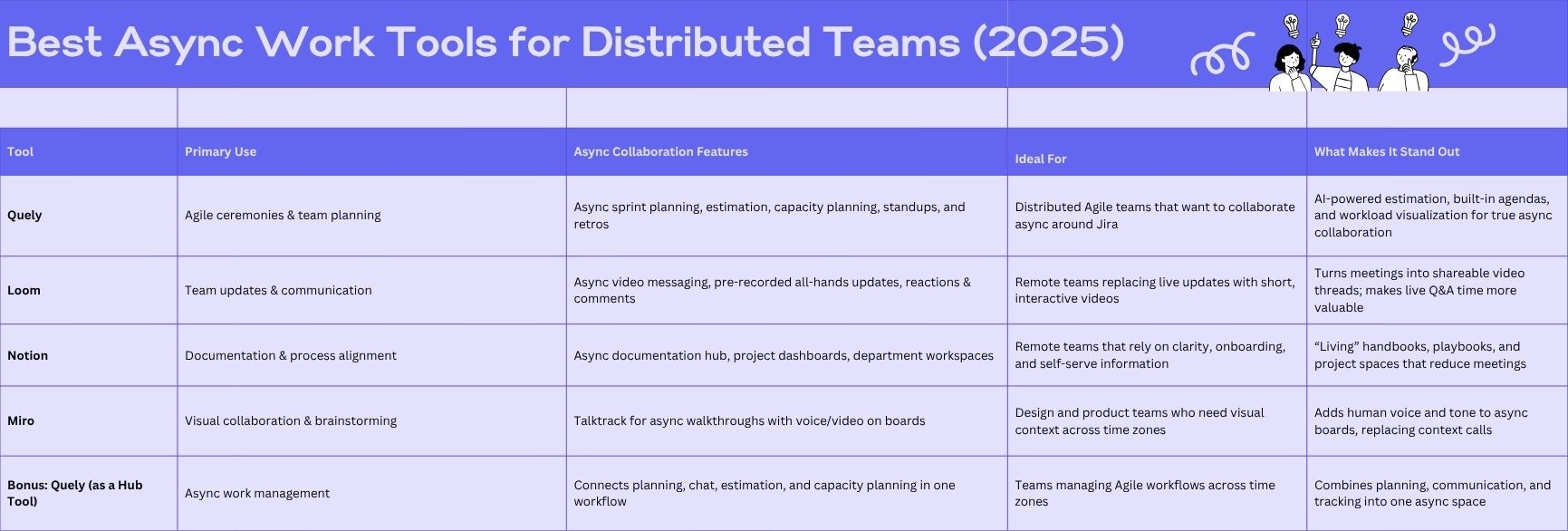
3. Notion: Instead of repeating a general product overview, this section examines how remote teams use Notion to collaborate asynchronously, document decisions, and stay aligned across time zones. Verify current product capabilities on Notion’s official site.
In this article about transitioning to async work and solving common challenges with async work, we wrote that documentation is essential for asynchronous documentation. It’s better to overcommunicate than to under communicate and Notion makes that easy.
One team that has hacked how to use Notion for this is Clearfire. Here’s a detailed breakdown of how Clearfire uses Notion and what you can learn from their approach:
Handbook: The All-in-One Operational Guide: Clearfire’s Handbook in Notion isn’t just a set of policies—it’s a living, breathing document that keeps everyone aligned. It includes
Company Policies: Everything from HR guidelines to communication norms.
Toolkits and Resources: A curated collection of tools, tutorials, and best practices, making it easy for team members to find the support they need.
Process Playbooks: Step-by-step guides for recurring tasks, like running a sprint or onboarding a client.
Takeaway: Even if you already use Notion for documentation, consider creating a dedicated "Handbook" section to codify your team's unique processes and ensure new hires ramp up quickly.
Projects: Clarity at Every Stage: For Clearfire, Notion acts as a centralized repository for project-related details, filling in the gaps left by tools like Basecamp and GitHub. Each client project gets its subfolder with the following:
Development Roadmaps: Clearly defined stages, milestones, and deadlines.
Objective Tracking: A space to document goals and evaluate outcomes.
Challenges and Resolutions: A log of roadblocks encountered and how they were addressed—essential for learning and iteration.
Takeaway: Use Notion to create detailed project dashboards that don’t just outline tasks but also capture lessons learned, helping your team refine its processes over time.
Developer Workspace: Workflow Mastery: Clearfire dedicates an entire section in Notion to developer-specific workflows, ensuring technical team members have everything they need to succeed. This includes:
Coding Standards: Guidelines for maintaining code quality and consistency.
Pull Request Best Practices: Tips for crafting pull requests that are easy to review and approve.
Deployment Guides: Step-by-step instructions for deploying code to different environments.
Takeaway: Consider building a specialized space for each department in your team, tailoring the content to their needs. Developers, designers, and marketers have unique workflows that can benefit from centralized documentation.
Results
What sets Clearfire apart isn’t just their use of Notion but the culture they’ve built around it. Here’s what they’ve achieved:
Streamlined Onboarding: New hires get up to speed faster because all the information they need is documented and easy to find.
Reduced Communication Overhead: Async work thrives on clarity, and Clearfire’s documentation ensures fewer meetings and quicker resolutions.
Enhanced Project Outcomes: With every detail documented, team members can focus on execution without wasting time tracking down information.
How You Can Apply This
Take a page from Clearfire’s playbook by revisiting your Notion setup. Ask yourself:
Are your processes documented in such a way that a new team member can follow them without asking questions?
Do you have dedicated spaces for each aspect of your work (e.g., projects, departments, goals)?
Are you using Notion’s features—like linked databases and templates—to simplify recurring tasks?
Clearfire’s approach proves that documentation doesn’t have to be boring or time-consuming. With a little effort upfront, your team can turn Notion into a strategic asset that supports your async team.
4. Miro: If you do a lot of your work in Miro and notice that team members often need additional context after looking at your board (which causes you to schedule separate meetings to walk them through it), Miro has a feature that solves this. Fujitsu used it to improve async work and host better meetings when necessary.
Distributed teams often face challenges in conducting effective all-hands meetings asynchronously, such as scheduling conflicts across time zones and the lack of real-time interaction. Miro's Talktrack feature was a solution to this, enabling teams to create interactive audio or video walkthroughs directly within Miro boards.
Problem: Inefficient Asynchronous All-Hands Meeting
Fujitsu’s distributed teams struggled with meeting overload and poor knowledge transfer. Written updates didn’t capture tone or context, and live meetings were hard to schedule across global time zones. The result was missed information, repeated explanations, and wasted time
Solution: Implementing Miro's Talktrack
To fix this, Fujitsu used Talktrack, a Miro feature that lets you record audio or video walkthroughs directly inside boards. Instead of hosting long synchronous meetings, they recorded short, focused walkthroughs explaining updates, diagrams, or planning boards.
Teammates could then watch and comment asynchronously, with full context like voice, visuals, and annotations when they can..
Results: Clearer Communication
Talktrack helped Fujitsu communicate more efficiently. The number of meetings reduced as they could easily share information asynchronously with the necessary context. This saved time and enhanced team dynamics as it ensured that messages were conveyed with the appropriate tone and nuance.
Takeaway
Incorporating tools like Miro's Talktrack can transform asynchronous all-hands meetings by embedding interactive, context-rich recordings directly into collaborative spaces. This method addresses common challenges in distributed teams, such as time zone differences and the impersonal nature of text communication.
How to Apply This in Your Team
Identify Key Meeting Content: Determine which parts of your all-hands meetings can be pre-recorded using Talktrack. This might include project updates, announcements, or detailed explanations that benefit from visual aids.
Create Engaging Talktracks: Record your walkthroughs directly within the relevant Miro boards, ensuring they convey the necessary context and nuances. Encourage team leaders to use this feature to share their insights and updates.
Facilitate Interactive Engagement: Share the Talktrack recordings with your team before the meeting. Encourage team members to interact with the board by adding comments, questions, or feedback directly within the Talktrack.
Streamline Live Meetings: Use the live meeting time to address any questions or discussions that arose from the Talktrack, focusing on decision-making and collaborative problem-solving rather than information dissemination.
Conclusion
Async work tools are essential for distributed teams. With these tools, distributed teams can reduce meeting bloat while communicating clearly and collaborating efficiently.
If your team needs to connect execution objects with synthesized understanding from several systems, consider Quely. Spaces organize the work; Context Units preserve understanding; Orbit and Signals show what needs attention.
In addition, it gives you capabilities to move sprint planning and capacity planning, even standups and retrospectives, async, helping agile teams collaborate asynchronously without losing alignment or context.
Explore Quely to see how Spaces, Units, Orbit, Signals, Lenses, and Ownership support distributed delivery decisions.