Runn vs. Float vs Quely for Capacity Planning: Which One is Best for Your SaaS Product Team?
By The Quely Team — Quely editorial team
When SaaS product and engineering teams look for a capacity planning tool, they’re not just comparing features, they’re making decisions about how their teams work.
Can this tool help us plan the next sprint or the next two quarters?
Will it reduce ambiguity or add another layer of work?
How well does it plug into our current workflow and stack?
Float and Runn are dedicated resource-planning products. Quely approaches delivery planning differently: it connects work and context across the systems a team already uses, then helps the team understand commitments, workload, available capacity, and delivery risk. That difference matters when choosing between a scheduling tool and a broader intelligence layer.
In this article, we'll discuss these differences in depth, drawing from the experiences shared on review platforms, Reddit, and community forums. Our goal is to help you make the best decision for your team not just based on what’s in a feature list.
What Product Teams Are Really Trying to Do with Capacity Planning
For most SaaS product and engineering teams, capacity planning means answering questions like:
- Who is available to work on this project next week?
- Can we start this new initiative without delaying something else?
- Do we need to hire to meet our roadmap goals
- Are any team members overbooked or underutilized?
These aren’t just scheduling questions—they’re about making informed decisions with limited time, people, and context. Good capacity planning tools help teams see what’s coming, adjust plans as things change, and keep everyone aligned without bouncing between spreadsheets.
Float: What Users Like (and Don’t Like) About This Capacity Planning Tool
The biggest reason people like Float is its visual design. It’s easy to see your team’s schedule at a glance. You can drag and drop tasks onto a calendar to adjust schedules. Many users say this saves them time compared to using spreadsheets.
Another highlight is that Float is easy to get started with, even for new users. It doesn’t take long to set up a project or assign tasks. Some people mention that while it’s simple to use, it can take a little time to learn all of its features. Luckily, Float offers helpful guides and a support team to answer questions.
Best suited for:
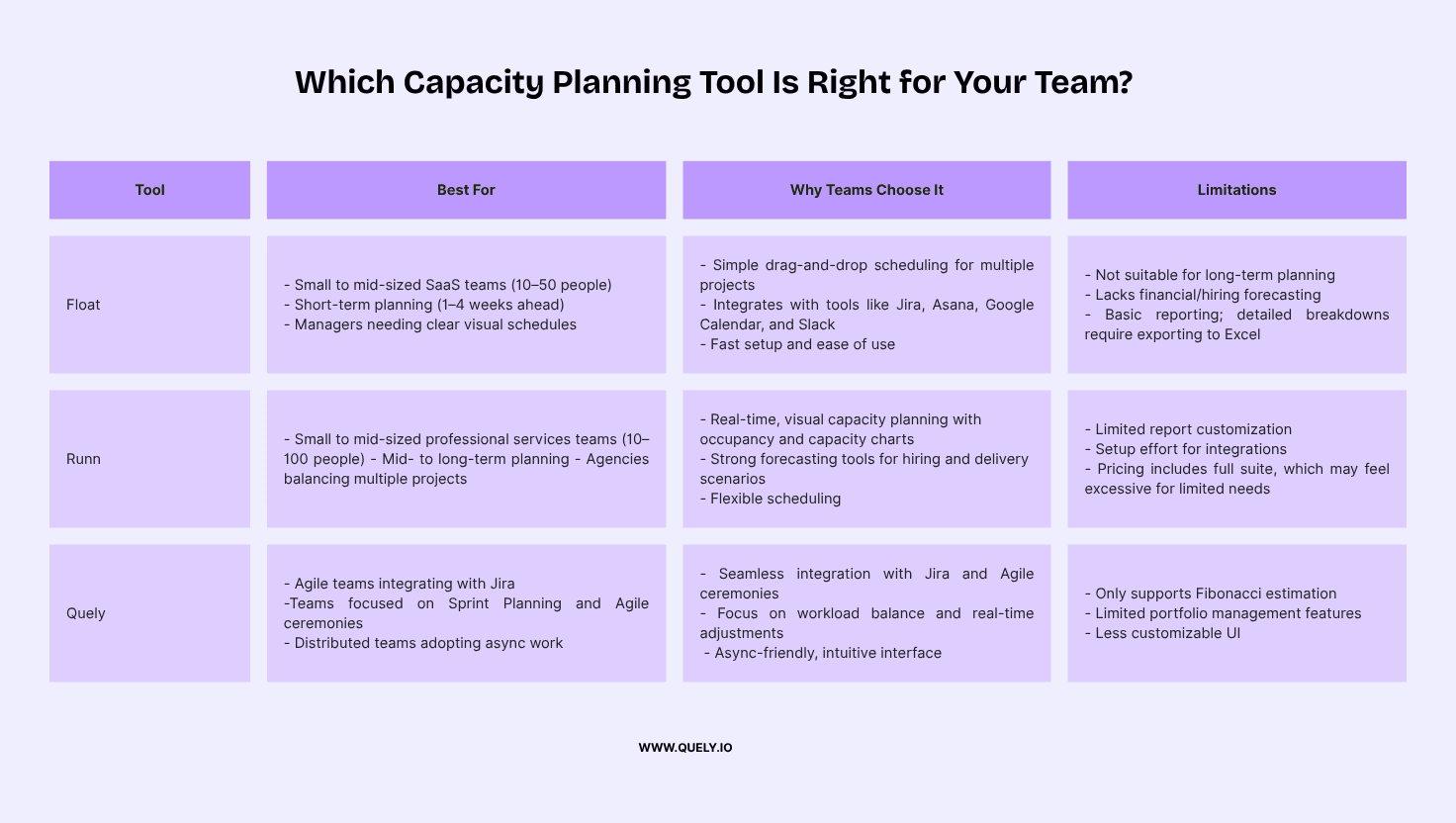
Small to mid-sized SaaS teams (10–50 people)
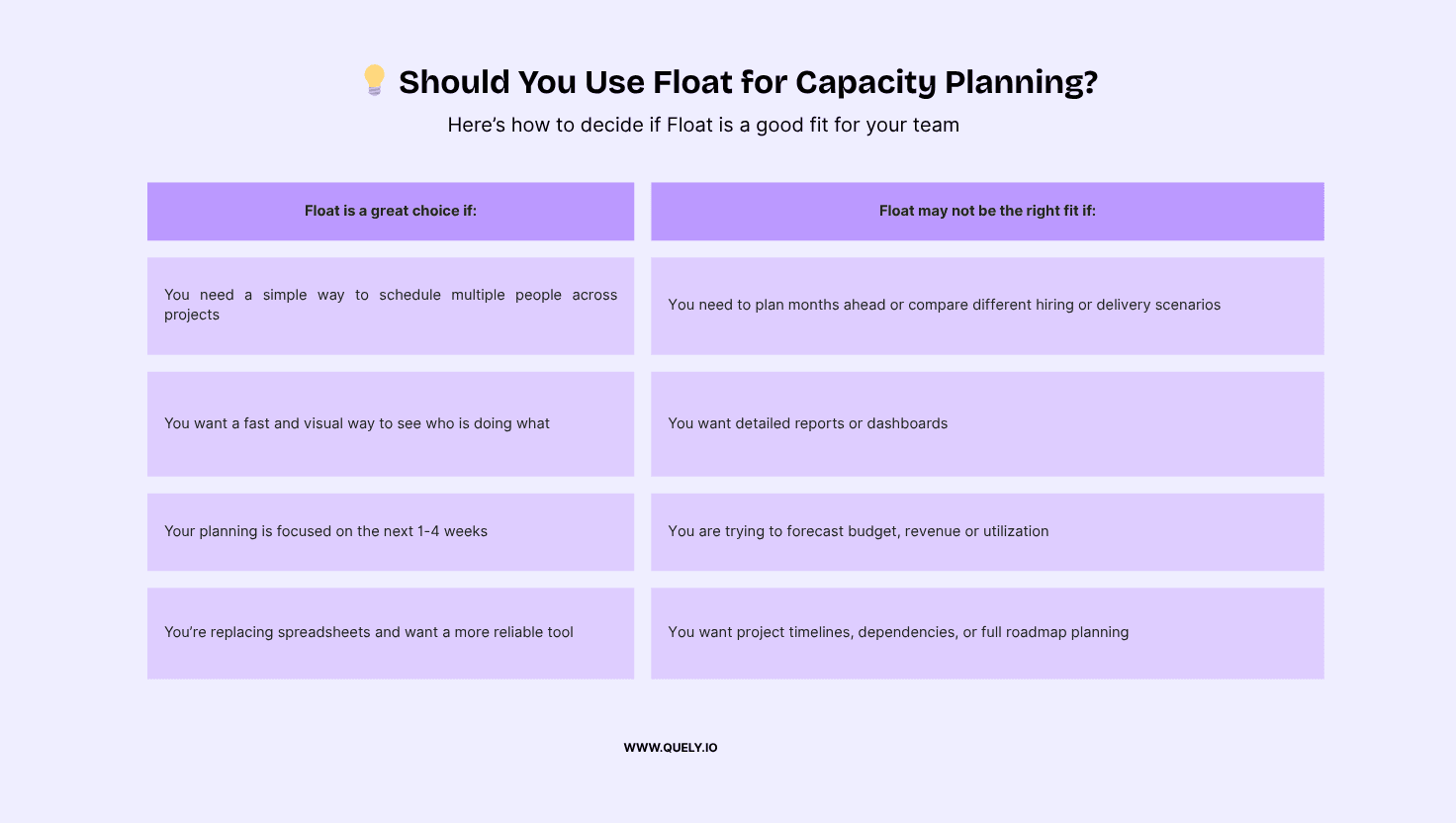
Teams that need to plan a few weeks ahead
Teams working on multiple projects at once
Managers looking for a clear, visual way to schedule work
Why teams use Float
Float is designed to help teams quickly see who is working on what, and when. The interface is simple and easy to learn. Most users like how they can assign tasks by dragging and dropping them onto a timeline.
Float works well with other tools. It integrates with:
Jira, Asana, Trello – to sync tasks
Google and Outlook Calendars – to track availability
Slack – to notify the team of changes
Harvest and other time tracking tools – to link actual hours to plans
What Float does well
Short-term planning: It’s great for scheduling work for the current sprint or the next few weeks.
Resource visibility: Managers can easily see if someone is overbooked or underused.
Fast setup: Most teams are up and running in a day or less.
Where Float has limits
Float is not built for long-term planning or strategic forecasting. Here’s what it doesn’t do:
No long-range planning: You can’t easily plan projects several months in advance or compare different scenarios.
No financial or hiring forecasting: Float doesn’t help you figure out if you need to hire or how much a delay might cost.
Basic reporting: Reports are limited. If you need detailed breakdowns, you’ll likely need to export to a spreadsheet.
Runn, Why Teams Choose it & More
The biggest reason people like Runn is its real-time visual planning. Teams love the drag-and-drop interface, color-coded charts, and interactive timeline that shows exactly who’s working on what — and who has room. Multiple users say Runn’s occupancy and capacity charts are now essential for planning. One Redditor put it this way: “None of the alternatives show me capacity and leads like Runn does.”
Another standout is Runn’s forecasting power. Teams can plan tentative projects, adjust workloads on the fly, and instantly see how changes affect utilization. Whether you’re allocating across 10 or 50 people, users say the scheduling stays manageable and flexible. For teams juggling multiple projects, this dynamic, bird’s-eye visibility is a game changer.
Best suited for:
Small to mid-sized professional services teams (10–100 people)
Agencies, consultancies, and remote-first product teams
Teams that need to plan weeks or months ahead
Managers balancing team capacity across multiple active and tentative projects
Why teams use Runn
Runn is built to help teams plan confidently, not just for today — but for the next quarter or more. The interface is clean and easy to learn, with many users praising how fast it is to build a schedule and adjust it over time. You can assign work, add placeholders for future projects, and track time-off, all within the same timeline view.
The real power comes from the ability to forecast scenarios. Users appreciate that charts and reports update in real time, so they can understand the impact of changes instantly. This makes Runn especially useful for project managers and team leads who need to model different workloads, hiring needs, or delivery timelines.
Runn also plays well with others. It integrates with:
Jira – via third-party connectors
Calendar tools – for syncing availability
Slack – for communication workflows
Custom APIs – to link with internal tools or CRMs
What Runn does well
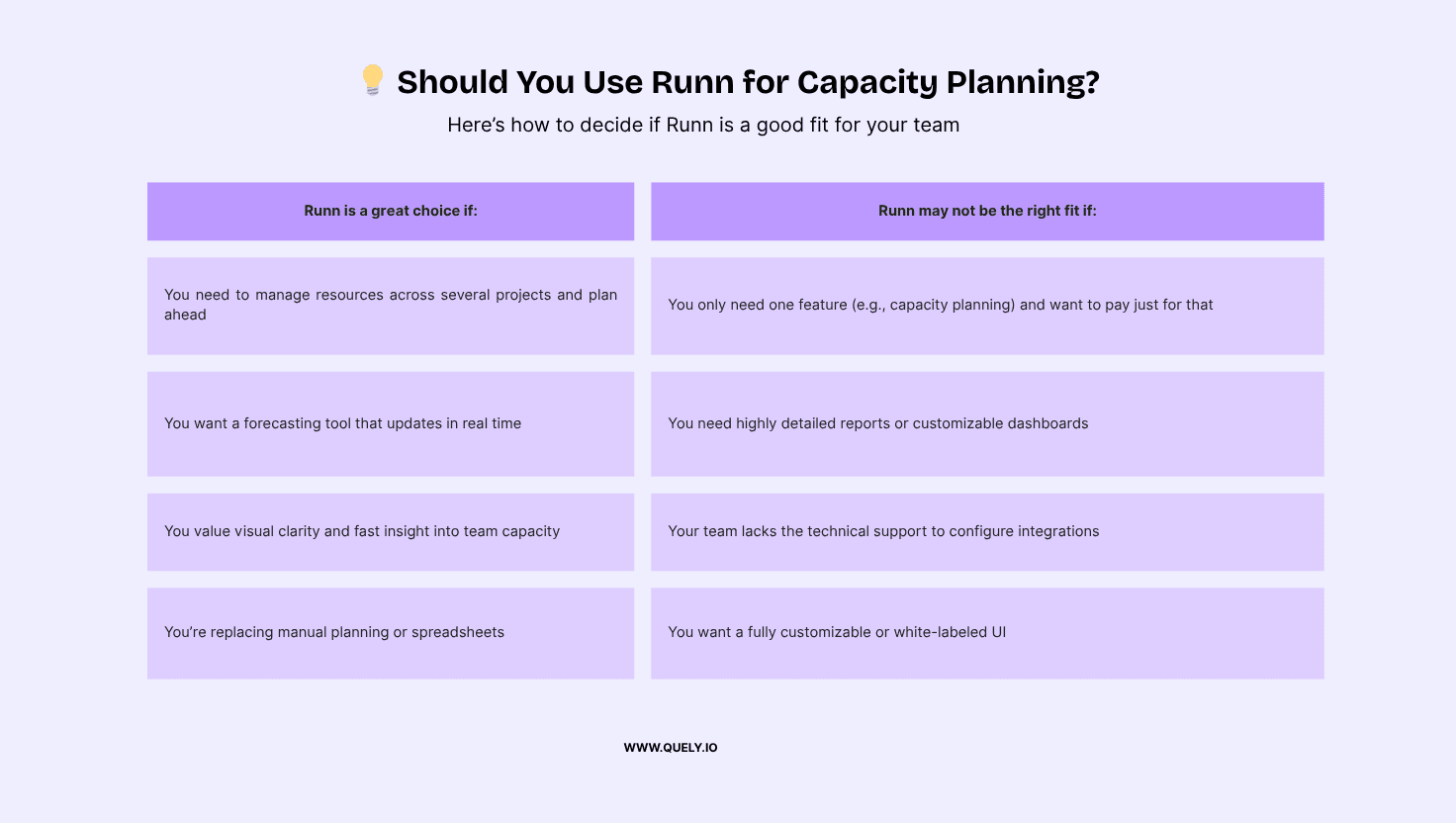
Mid- to long-term forecasting: Runn helps teams model different project or hiring scenarios with dynamic charts.
Real-time capacity visibility: The timeline shows who's available, overbooked, or underutilized.
Flexible scheduling: Placeholders, time-off, and tentative projects can all be planned visually.
Support and responsiveness: Many users say Runn’s support team is proactive and quick to implement feedback.
Simple onboarding: Teams consistently mention the UI is intuitive and doesn’t require extensive setup or training.
Where Runn has limits
Runn is a strong capacity planning tool, but it’s not perfect for every scenario. Here’s where users report friction:
Limited customization: You can’t heavily tailor dashboards or workflows. Power users may want more control.
Integration setup takes effort: Runn offers flexibility via its API, but setup isn’t plug-and-play. Non-technical users may need support.
Not modular pricing: Some teams only need the capacity planning features, but Runn’s per-user pricing includes the full suite. That can feel pricey if you're only using a slice of the tool.
Basic reporting: Export to CSV is available, but detailed dashboards and report customization are limited out of the box.
Quely: Capacity Context Within a Broader Intelligence Layer
Quely is not a standalone resource scheduler. It is an intelligence layer across the systems teams already use. Work and context enter a Space, where they can be understood together before a team makes a delivery commitment.
How Quely Supports Capacity Decisions
1. Connected work and context: Jira issues and other execution objects can enter a Space as Work Units, alongside the Context Units needed to understand goals, decisions, constraints, and prior discussions.
2. Ownership: Ownership provides an execution view of responsibility, current commitments, team workload, and available capacity. It helps teams test whether proposed work fits the people expected to deliver it.
3. Orbit and Signals: Orbit reasons across connected Units and can surface dependencies, blockers, risks, assumptions, and unanswered questions as Signals before they become delivery surprises.
4. Lenses: Teams can examine the same connected context from different perspectives—for example, delivery risk, dependencies, or ownership—without duplicating the underlying work.
5. Asynchronous review: Because the work and its context remain connected, distributed teams can review assumptions and capacity constraints on their own schedules before committing.
Planning Problems This Model Helps Address
Uneven work distribution: Ownership makes workload and responsibility visible so teams can discuss overload before adding more commitments.
Unclear goals: Context Units keep goals, decisions, and constraints connected to the Work Units they affect.
Disconnected workflows: Spaces connect execution objects with the discussions and synthesized context needed to understand them.
Hidden change: Signals help teams notice shifting priorities, dependencies, blockers, and assumptions while there is still time to respond.
How Quely Stands Out
Broader intelligence model: Quely connects delivery decisions to work, context, and ownership rather than treating capacity as an isolated spreadsheet or ceremony.
Asynchronous by default: Distributed teams can review context, surface concerns, and clarify commitments without forcing every decision into a meeting.
Contextual decisions: Orbit, Signals, Lenses, and Ownership work from the same connected Units, reducing the need to reconcile separate planning artifacts.
Should You Use Quely?
Quely is a great choice if:
You need delivery decisions to reflect connected work from Jira and other systems.
You want responsibility, workload, commitments, and available capacity to be visible together.
You want planning conversations grounded in the context and risks surrounding the work.
You need distributed teams to review and clarify work asynchronously.
You want Orbit to surface decisions, questions, dependencies, blockers, and risks from connected context.
Quely may not be the right fit if:
You only need a standalone resource scheduler or timesheet product.
You require highly detailed project portfolio management features.
You need detailed cross-project resource optimization, billing, or timesheet administration.
You only need a lightweight voting utility with highly customizable estimation decks.
You need a fully customizable or white-labeled UI.