The Top 5 Productivity Blockers for Software Teams and How to Fix Them
By The Quely Team — Quely editorial team
Most product and engineering teams are capable of extraordinary work. So when it appears as though they are not living up to this potential, you have to dig deep to find out what the problem is.
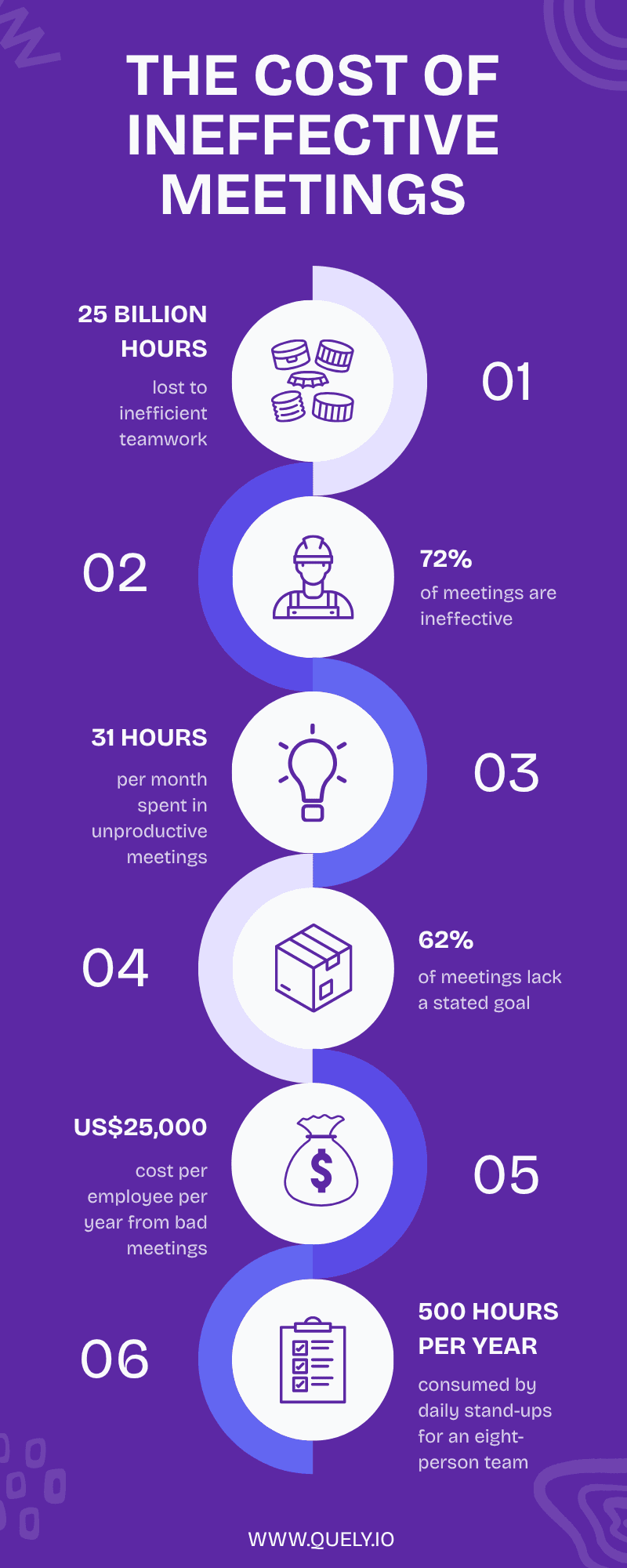
When you do, you’ll find out that it is time. The Atlassian State of Teams report calculates that roughly 25 billion hours are lost every year due to inefficient teamwork. That's not an abstract number. It's your senior developer sitting in their fifth status meeting of the week, wondering when they'll actually get to code.
In this article, we share the top productivity blockers for software teams and give you practical responses, supported where possible by published research and primary operating guidance, that your team can test against its own delivery data.
1. Meeting Overload & Numerous Status Calls
To keep your team aligned and make decisions, you need meetings. The downside is, meetings are so poorly run that about 72 % of them are ineffective, and roughly three in four meetings waste time and resources.
Poorly planned meetings consume time without creating decisions, clear goals, or useful follow-through. Estimate the cost from your own calendar and compensation data; vendor-sponsored cost-per-employee figures are not universal benchmarks.
Daily standups also carry a coordination cost. Calculate it from attendee count, duration, frequency, and fully loaded compensation, then compare that cost with blockers resolved and decisions accelerated.
How to Fix Meeting Overload
Audit your calendar. Review recurring meetings and identify which ones only distribute information. Move those updates to an asynchronous format, then reserve live time for decisions, design reviews, relationship-building, or urgent unblocking. This async-meeting guide provides a practical structure.
Set clear goals and agendas. You can enforce a rule that says no agenda no meeting. Make it mandatory that everyone include a purpose and desired outcome in every invite. If the organizer doesn’t include an agenda, encourage your team to cancel the meeting or to shift async updates.
Time-box your ceremonies. Keep sprint planning to two hours and try to keep your stand-ups under eight minutes. Reserve meetings for actual decisions, pairing work, and unblocking critical issues, not status updates that could be shared via Slack thread.
Protect no-meeting blocks religiously. Introduce "no-meeting mornings" or dedicate one full day a week as a meeting-free day. In place of meetings, use video updates, chat threads, or collaborative documents so developers can consume information when they have the mental bandwidth.
TL;DR fix: Remove or shorten recurring meetings that only distribute information, move routine status updates async, and protect focused-work blocks. Set a target from your own calendar audit.
Productivity Blocker #2: Constant Context Switching
To explain the impact of context switching, I’ll use an example. Imagine one of your engineers is deep in a tricky refactor. They’ve got three files open, an architecture diagram on the side, and the whole problem mapped out in their head. They’re finally making progress when a Slack message pops up. They read it. Even though the message wasn’t urgent, it had already interrupted their flow.
They’ve lost the 20 minutes it took to build up that mental model. We know this because it takes about 23 minutes to regain focus after a single interruption. Recovery time varies by person, task, and environment, so do not convert one study into a universal productivity-loss percentage. Instead, measure interruption frequency, blocked time, and cycle-time changes in your own workflow.
To clarify, we are not advocating for silos. We know that collaboration is essential to teamwork. The problem is we've normalized treating every question like it deserves an immediate response.
The consequence is that when developers know they might be interrupted at any moment, many of them don't even attempt deep work. They stay in "shallow work mode," focusing on easy tickets because starting something complex feels risky. This erodes their capacity for hard problems like architectural challenges and so on.
Not every question is equally urgent. Define response-time expectations by urgency and impact instead of treating every message like an interruption.
How to Fix Context Switching & Digital Distractions
Establish deep-work blocks. Create two- to three-hour windows each day where engineers can mute notifications and actually think. Take these time blocks seriously.
Batch communication intentionally. Encourage your team to check email and Slack at set intervals, say, 10 AM, 2 PM, and 4 PM rather than reacting to every message. To make this work, have everyone set their availability. Also, as a team, set a clear path for urgent issues, so focus time doesn’t come at the expense of responsiveness.
Move routine status updates async. Written or recorded updates can preserve live meetings for problem-solving. When status depends on connected execution and context, Quely can organize the relevant Work Units, Context Units, and Signals in a Space.
TL;DR Fix: Mute everything during deep-work blocks. Batch communication. Make status updates async.
Productivity Blocker #3: Fragmented Tooling & Brittle CI/CD Pipelines
To get work done, your team is juggling Jira, GitHub, Slack, Confluence, Notion, DataDog, and other tools. They’d likely spend 8–15 hours daily and lose around 20 hours per week searching for information across these siloed tools.
In addition to this, engineers have to deal with flaky CI pipelines and slow continuous‑integration cycles – failures that force them to rerun tests and switch tabs repeatedly.
How to Fix Fragmented Tooling & Brittle CI/CD
Connect your toolchain. Consolidation is not always practical. Quely instead acts as an intelligence layer across connected systems, so work and synthesized context can be examined together without claiming to replace every source tool.
Create a "golden path." Standardize and document how your team should build, test, and deploy services. Try to keep CI pipelines under ten minutes. Repair flaky tests immediately and auto-assign reviewers to cut idle time.
Surface knowledge proactively. Maintain architectural decisions, runbooks, and FAQs where the team can retrieve them. Measure time-to-answer and repeated questions instead of applying a universal search-time percentage.
Connect work with context. Jira issues and other execution objects can enter Quely as Work Units, with Context Units and Signals preserving the decisions, risks, dependencies, blockers, and assumptions surrounding them.
TL;DR Fix: Cut tool sprawl. Stabilize your CI/CD. Build a single source of truth for knowledge.
Productivity Blocker #4: Unclear Requirements & Slow Decision-Making
Nothing derails a sprint faster than vague stories or changing priorities. In a 2023 survey of 305 U.S. knowledge workers commissioned by Slingshot, 34% said they had to guess their priorities. Treat that result as a vendor-sponsored survey rather than a universal benchmark.
When priorities shift mid-sprint or tickets lack defined boundaries, engineers oscillate between tasks and deliver late.
How to Fix Unclear Requirements & Slow Decisions
Write crisp acceptance criteria. Define what “done” means and list non-goals to prevent gold-plating. Agree on a context-specific quality bar rather than using a universal percentage.
Adopt MoSCoW or stack-ranking frameworks. Classify tasks as Must, Should, Could, or Won't. Review these classifications each sprint so new requests don't silently jump the queue and throw off your entire plan.
Surface blockers early. Engineers should raise unclear requirements during refinement rather than days into execution. Orbit can analyze connected Units and surface questions, dependencies, blockers, risks, and assumptions as Signals for the team to resolve.
TL;DR Fix: Write clear acceptance criteria. Define non-goals. Empower engineers to challenge vague requirements.
Productivity Blocker #5: Chaotic Planning & Inefficient Processes
Agile rituals are supposed to bring structure and predictability to how you work. Instead, they've become another overhead that everyone complains about. For example, some teams spend a lot of time in planning or status meetings, which takes away the time they should spend executing the work.
Issues like constant reprioritization lead to unrealistic sprints and burned-out engineers who lose faith in agile processes.
How to Fix Chaotic Planning & Inefficient Processes
Time-box your ceremonies. Keep sprint planning to a strict two-hour limit and retrospectives to 45 minutes. Stand-ups should be concise updates, not problem-solving sessions. If it runs long, take it offline.
For planning that begins asynchronously, organize the candidate Work Units and supporting Context Units in a Space, use Orbit and Lenses to examine the open Signals, then move only unresolved decisions into a live discussion.
Plan from evidence. Combine delivery history with absences, current commitments, risk, and work complexity. In Quely, Ownership provides responsibility, workload, commitments, and available-capacity context; it is not a replacement for detailed resource scheduling or timesheets.
Groom the backlog regularly. Schedule dedicated backlog refinement sessions so planning meetings don't run longer than necessary.
Run meaningful retrospectives. Ask whether each process step adds real value. Experiment with changes and measure the impact on cycle time, deployment frequency, and defect rates. If you're not changing anything based on retros, stop having them.
TL;DR Fix: Time-box everything. Plan to capacity, not wishful thinking. Make retros actionable or skip them.
3 Additional Productivity Blockers for Software Teams
Return-to-Office Mandates
Hybrid work policies are here to stay, but forced office returns often reduce focus time and increase shallow collaboration. The mental load of commuting and ad-hoc office interruptions fragments the workday, making deep thinking harder.
Be intentional about in-office days. Use co-located time for activities that genuinely benefit from face-to-face collaboration—pairing sessions, whiteboarding, and onboarding. Save deep-work tasks for remote days when engineers are more in control of their environment.
Design the office for focus. Provide quiet zones and enforce respectful norms around interrupting colleagues. A well-designed workspace can reduce context switching and improve the developer experience.
Perfectionism & Over-Engineering
Engineers are craftspeople, and that's beautiful. But endless polishing, what folks in communities call "yak-shaving" delays delivering actual value. Over-engineering creates the illusion of progress while business outcomes stall.
Set a “good enough” bar. Build the simplest version that meets the agreed requirements, define explicit non-goals, and iterate from real feedback.
Time-box design discussions. Limit RFC discussions and architecture reviews to a set time. Encourage teams to ship small increments rather than waiting for perfect consensus that never comes.
Reward outcomes, not output. Celebrate features that deliver customer value, not just technical elegance. Recognizing impact fosters a culture of pragmatism over perfectionism.
AI Tools: Promises vs. Reality
AI coding assistants promise to turbocharge software development productivity. The reality is more nuanced. Some controlled studies find that experienced developers can actually be slower when using AI on complex tasks due to the time spent prompting and reviewing outputs, even though they feel more productive.
Engineers emphasize that AI helps with scaffolding and documentation, but struggles with high-context changes that require deep system knowledge.
Use AI selectively. Employ AI for boilerplate code, test stubs, and documentation, freeing human effort for design decisions. Don't delegate high-risk or highly contextual changes solely to AI.
Set review depth guidelines. Agree on how thoroughly AI-generated code should be reviewed. Over-reviewing can erase any time saved.
Measure the actual impact. Track cycle times with and without AI assistance. If AI isn't reducing end-to-end delivery time in practice, reassess how you're using it.
Top-Tested Productivity Playbook for Engineers
Top-performing teams don't just fix individual blockers. They combine these tactics to form a cohesive system:
Protect focus: Schedule no-meeting mornings or two deep-work blocks per day. Mute chat and email by default during these periods.
Batch status: Replace most status meetings with async updates. Reserve live sessions for decisions, design reviews, or unblocking critical work.
Tighten PR flow: Keep pull requests small and set review SLAs (e.g., first response within 24 hours).
Stabilize CI/CD: Repair flaky tests and ensure builds complete in under ten minutes. Document a "blessed" path for new services.
Clarify tickets: Write explicit acceptance criteria and non-goals. Align early with stakeholders to reduce requirements thrash.
Be intentional with AI: Use AI for scaffolding, boilerplate, and docs; avoid giving it high-context tasks. Set review depths to avoid inflated PR cycles.
How to Measure Progress
Track metrics like:
Pull-request cycle time
Review response time
CI build duration
Meeting hours per developer
Number of focus blocks per week
Ratio of planned work completed per sprint
Monitoring these numbers shows whether your changes actually improve developer efficiency and overall engineering productivity or not
Common Questions About Engineering Productivity Blockers
What are the most common productivity blockers for developers?
The top blockers are meeting overload, constant context switching from notifications, fragmented tooling, unclear requirements, and chaotic planning processes. These issues compound; context switching makes meetings feel worse, which makes unclear requirements even more frustrating.
How can software teams reduce context switching?
Establish protected deep-work blocks where notifications are muted, batch communication to set intervals instead of constant monitoring, move status updates to async formats, and use integrated tools that reduce tab-hopping between systems.
What tools help software teams improve productivity?
Connect execution objects with the context needed to act. Quely organizes Work Units, Context Units, Signals, and Ownership across systems; stable CI/CD and maintained documentation address different parts of the productivity problem.
Summary
Improving engineering productivity isn't about squeezing more hours out of your team. It's about removing the friction that prevents them from doing their best work.
By ruthlessly eliminating unproductive meetings, guarding against context switching, consolidating fragmented tools, clarifying requirements, streamlining processes, supporting flexible work, avoiding over-engineering, and using AI deliberately, software teams can reclaim those lost 25 billion hours.
The result? Happier engineers who actually get to build things. Better products that ship faster. And a healthier business that isn't constantly firefighting productivity problems.
Your engineers have the talent. Now give them back their time.