Top 3 Alternatives to Planning Poker Online for Jira [2026]
By The Quely Team — Quely editorial team
Updated July 2026: We revalidated the comparison logic, removed fragile exact-price and free-tier claims, and updated Quely’s section to its current work-intelligence model. Confirm current plans and integrations on each vendor’s official listing.
If you estimate with Planning Poker for Jira, you know it has its own shortcomings. Duplicate participants showing up in sessions. Estimates mysteriously disappearing mid-session. Challenges with remote or asynchronous estimation. These aren't just minor annoyances. They affect your sprint planning.
After researching user reviews on Reddit, G2, Capterra, and Atlassian Community forums, and analyzing what users actually say about these tools, I've identified three alternatives for the planning poker tool, Planning Poker Online. Whether you need better async support, multiple estimation methods, or just something simpler, here are the top three alternatives to the estimation tool, planning poker online.
TL;DR: Which Planning Poker Online Alternative Should You Choose?
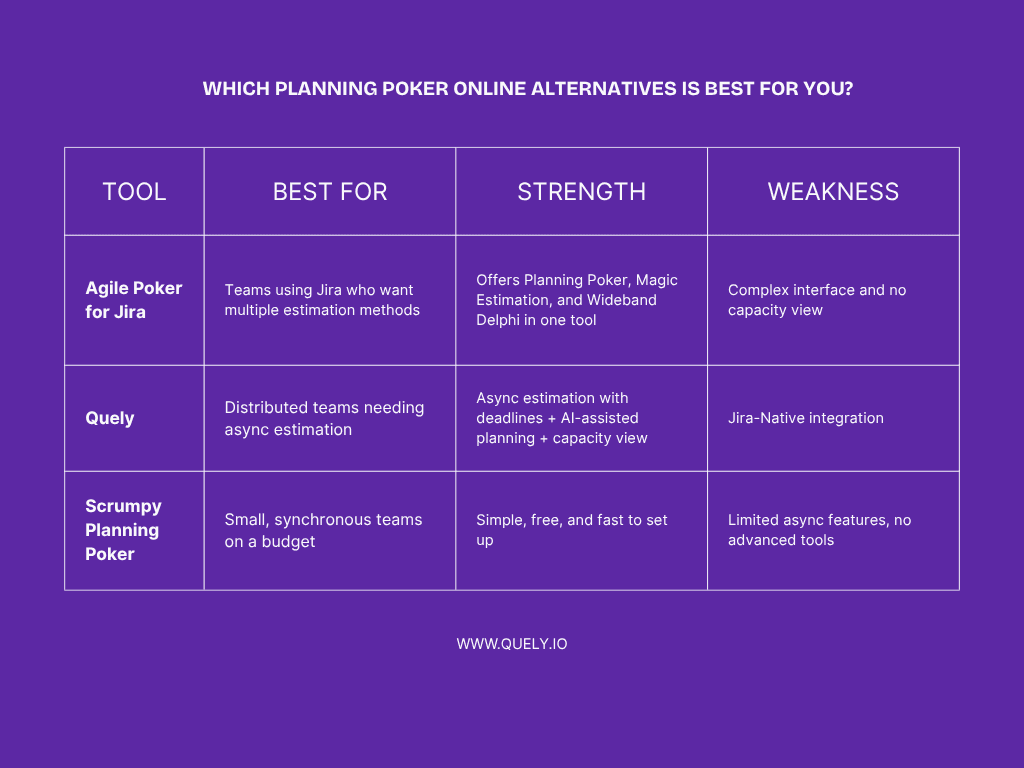
Agile Poker for Jira: Best if you want multiple estimation methods (Planning Poker, Magic Estimation, Wideband Delphi) in one Jira-native tool.
Trade-off: Complex interface with a steeper learning curve.
Quely: Best for teams that need connected context, risks, dependencies, and ownership around an estimation workflow—not only a voting room.
Trade-off: Only project management tool it supports right now is Jira..
Scrumpy Planning Poker: Best for small, co-located teams wanting simple, free Planning Poker.
Trade-off: Limited async support and no advanced features.
Bottom line: Choose Quely when estimation depends on context spread across multiple systems. Choose a dedicated voting product when your main requirement is a simple deck, timer, and reveal flow.
For the full breakdown, keep reading.
Why Teams Are Looking for Better Estimation Tools
Many teams use various Planning Poker tools and encounter similar frustrations. Whether you're using Planning Poker Online, a Jira plugin, or another estimation tool, common problems emerge.
Anchoring bias still happens. Even with simultaneous card reveals, the discussion after the reveal causes estimates to gravitate toward the first numbers mentioned. Research in cognitive psychology shows that anchoring bias persists even when you try to design around it.
Synchronous sessions create bottlenecks. When your team is spread across San Francisco, London, and Bangalore, scheduling a 2-hour estimation session becomes nearly impossible. Someone's always missing, which means you're making estimates without complete team input.
Group discussion amplifies optimism. A study published in the Journal of Systems and Software found that Planning Poker sessions actually increased optimism bias among less experienced teams. The collaborative discussion convinced teams that tasks were simpler than they actually were, leading to underestimation.
Sequential estimation causes fatigue. Estimating items one-by-one is mentally exhausting. By story 30, everyone's mentally checked out, and estimate quality tanks. You rush through the last items just to finish.
Technical issues compound the problems. Users on Atlassian Community forums and review sites frequently report issues like duplicate participants, lost estimates, and sessions crashing mid-planning. These aren't edge cases—they're recurring frustrations.
Platform lock-in limitations. Many estimation tools only work with one project management platform. If your organization uses multiple tools (Jira for engineering, Azure DevOps for another team, Linear for product), you need different estimation tools for different teams.
These problems explain why teams explore alternatives. Let's look at some of these alternatives.
Alternative 1: Agile Poker for Jira
What Agile Poker Does Well
Agile Poker helps you estimate work quickly without leaving Jira. It gives you different estimation methods to choose from, so you can pick the one that best fits your team.
Multiple estimation methods. You can use Planning Poker for your usual sprint discussions, Magic Estimation for large backlogs, Wideband Delphi for expert input, or the Team Estimation Game when you want a more collaborative session. Having all four options means you can switch methods based on the type of work you’re estimating.
Async sessions for distributed teams. Agile Poker supports asynchronous estimation, so your teammates can add their estimates on their own time instead of joining a meeting. This is useful if your team is spread across time zones.
Built directly into Jira. Because it’s a native Jira app, estimates flow into the Jira field for story points. There’s no need to sync data or copy results between tools.
Flexible estimation. You can estimate in Fibonacci numbers, T-shirt sizes, or create custom scales that fit their process.
Where Agile Poker Falls Short
Takes time to learn. The app includes a lot of options and settings, which gives you flexibility but can be confusing for new users. Several reviewers mention that it takes a few sessions to get familiar with the product.
Occasional session hiccups. Some users on G2 and Capterra mention sessions freezing or disconnecting participants mid-estimation. These issues aren’t common, but they can interrupt the flow when they happen.
Estimation only. No capacity view. Agile Poker helps you size work but doesn’t show workload or capacity. If you want to see who’s overbooked or under-utilized, you’ll need another tool.
Works only with Jira. Agile Poker can’t be used outside Jira, so if your team manages work in another platform, it’s not an option.
How Async Estimation Works
Create an estimation session and pick the Jira stories to size.
Choose an estimation method — Planning Poker, Magic Estimation, Wideband Delphi, or Team Estimation Game.
Team members get notified and submit estimates independently.
Review outliers and discuss results asynchronously or in a short sync.
Final estimates automatically update in Jira.
Pricing
Agile Poker pricing varies by Jira tier, hosting model, and Marketplace terms. Verify the current Cloud and Data Center prices on the official Atlassian Marketplace listing before calculating total cost.
Because pricing is tied to your total Jira user count (not just those using Agile Poker), costs can rise as your organization grows.
Who is Agile Poker Best For?
Medium to large teams (especially 10 to thousands of users) looking for flexible estimation methods inside Jira
Organizations with distributed or remote teams that benefit from asynchronous sessions
Teams already embedded in Jira who want a deeply integrated estimation tool
Teams willing to invest some time onboarding and training users on the interface
Not Ideal For:
Very small teams (1–5 users) that prefer something lightweight and minimal
Teams using multiple project management systems (non-Jira) — Agile Poker is Jira-only
Organizations that need built-in capacity planning, resource tracking, or workload visualization in the same tool
Alternative 2: Quely
What Quely Does Well
Connected context for estimation: Quely gives teams an intelligence layer across the systems they already use. Estimation remains one workflow around the work rather than the identity of the product.
This is useful for distributed teams because people can review work, context, and open questions before a commitment conversation instead of discovering everything in the meeting.
Work Units: Jira issues and other execution objects can enter a Space as Work Units while retaining the properties teams use in their existing workflow.
Orbit and Signals: Orbit reasons over connected Units and can surface questions, dependencies, risks, blockers, and assumptions as Signals. The team still owns the estimate and commitment.
Instead of presenting a number as objective truth, use the surfaced context to test what the team may have missed and document why it chose a particular estimate.
Ownership: Ownership brings responsibility, current commitments, team workload, and available capacity into the same execution view.
Context Units: Synthesized understanding from connected systems gives the team a clearer basis for discussing uncertainty, missing requirements, and delivery constraints.
Decision continuity: Signals and synthesized context stay connected to the work they affect, so later reviews can recover the reasoning behind a commitment.
Cross-system model: Jira can contribute Work Units and native properties, but it is one source in a broader model that also connects context from other systems.
Where Quely Falls Short
Not a dedicated card-voting utility: Quely is a broader intelligence layer. Teams that only need a lightweight room with a deck, timer, and reveal button may prefer a specialized product.
Different scope: Quely adds intelligence across connected work systems; it does not replace every project-management, financial-planning, or portfolio-administration product.
How It Works
A context-rich estimation workflow can look like this:
Jira issues and other execution objects enter a Space as Work Units.
Orbit surfaces open questions, dependencies, risks, blockers, and assumptions from the connected context.
Team members review those Signals and the underlying Context Units before sizing or forecasting the work.
The team resolves material disagreements asynchronously or in a focused conversation, then records the reasoning.
Ownership provides responsibility, current commitments, workload, and available-capacity context before the team commits.
The team keeps the final estimate and native work properties in its execution system of record.
Best For
Distributed teams across multiple time zones who need async estimation
Agile teams that need capacity planning and workload visibility alongside estimation
Organizations that want to integrate AI into planning
Teams committed to Jira with no plans to change platform
Not ideal for: Teams using multiple project management tools, organizations that need broad project management features beyond estimation and planning.
Alternative 3: Scrumpy Planning Poker
What Scrumpy Does Well
Extreme simplicity: Scrumpy is dead simple. You open it in a browser, create a session, and share the link. No installation, no account creation (for participants), no complex configuration. Your team can start estimating in under 2 minutes.
This simplicity is genuinely valuable. Not every team needs AI, capacity planning, or multiple estimation methods. Sometimes you just need straightforward Planning Poker that works.
Multiple options: You can choose Fibonacci, T-shirt sizes, or custom decks. This flexibility lets you match Scrumpy to your team's preferred estimation style.
Real-time collaboration: Scrumpy is best for live, synchronous estimation sessions. Everyone sees votes reveal simultaneously, and you can discuss in real-time. For co-located or synchronous remote teams, it works perfectly.
Jira integration: You can sync Jira stories into Scrumpy and push estimates back when you're done.
Cost consideration: Scrumpy may suit budget-conscious teams, but verify current plan limits and add-on pricing before selecting it.
No installation required: Being browser-based eliminates installation and maintenance overhead. No plugins to update, no compatibility issues with Jira versions.
Where Scrumpy Falls Short
Limited async support: This is Scrumpy's weakness. You can technically leave a session open and have people vote asynchronously, but there's no deadline management, no notifications reminding people to estimate, and no structure for async work.
No advanced features: Scrumpy does Planning Poker. That's it. No capacity planning, no AI suggestions, no collaboration tools, no analytics. If you need more than basic estimation, Scrumpy won't provide that.
Scaling issues: As your team grows and your estimation needs evolve, Scrumpy's minimalistic approach becomes limiting. You'll eventually need more features.
Integration scope: Scrumpy is centered on Jira. If you need another execution platform, verify current integrations directly with the vendor before choosing it.
How It Works
Here's a typical synchronous estimation session with Scrumpy:
You open Scrumpy in a browser and create a session
You share the session link with your team (via Slack, Teams, or meeting invite)
You import Jira stories or manually enter items to estimate
Everyone selects their estimate card
When everyone's voted, you reveal cards simultaneously
You discuss outliers and re-vote if needed
Final estimates sync back to Jira
For async estimation, you'd leave the session open and hope people remember to check it. There's no automated process.
Pricing
Scrumpy’s plans, integrations, and registration requirements may change. Verify the current web-app and Jira add-on terms on the vendor’s official site before relying on a free or paid tier.
Best For
Small teams (3-15 people) who primarily work synchronously
Co-located teams doing sprint planning together
Teams on tight budgets needing free, functional Planning Poker
Teams wanting minimal complexity and zero learning curve
Organizations testing out Planning Poker before committing to more robust tools
Not ideal for: Distributed teams needing async support, larger teams that need advanced features, teams that want capacity planning alongside estimation, or organizations using multiple project management platforms.
Choose Agile Poker If:
✓ You want multiple estimation methods in one Jira-supported tool
✓ Your team needs flexibility to try different approaches
✓ You have time to train people on a complex interface
✓ You use Jira exclusively and need deep integration
Choose Quely If:
✓ Your team needs context from multiple systems before estimating
✓ Risks, dependencies, blockers, and assumptions need to be visible
✓ Responsibility, workload, commitments, and available capacity affect the decision
✓ You want estimation to remain a team-owned workflow inside a broader intelligence model
Choose Scrumpy If:
✓ Your team is small and co-located
✓ You primarily work synchronously
✓ Budget is a major constraint
✓ You want dead-simple Planning Poker with zero learning curve
FAQs About Planning Poker Online Alternatives
Q: Can we switch tools mid-sprint?
Technically yes, but it's not ideal. Your historical velocity data won't transfer, which makes it harder to plan future sprints accurately. If you must switch, do it at the start of a new sprint or quarter so you're not disrupting active work.
Q: What if our team is half remote, half in-office?
Use an asynchronous process that gives remote and office-based participants the same time, context, and ability to raise concerns. Quely is useful when that context is spread across work systems; a dedicated voting product can work when the problem is only equal participation in the estimate.
Q: We use Jira, Azure DevOps, AND Linear. Which tool works with all three?
Integration coverage changes frequently. Check each vendor’s current documentation for Jira, Azure DevOps, Linear, and GitHub support, and distinguish a native integration from a manual import or connector.
Q: How do I convince my team to switch tools?
Run a pilot for one or two sprints. Compare preparation time, meeting time, participation, unresolved questions, and the amount of rework. Involve the team in the decision so the evaluation reflects the workflow they will actually sustain.
Q: What about teams new to Agile estimation?
Start with the product whose current workflow and plan limits fit your team. Once the team is comfortable with relative sizing, handling outliers, and documenting assumptions, consider whether deeper integrations or asynchronous review are worth the additional complexity.
Q: What if we need to estimate in multiple formats (story points, hours, T-shirt sizes)?
Dedicated voting products commonly offer several deck formats. Quely is better evaluated on whether connected context improves the team’s decision, not on a single deck format. Whichever approach you choose, keep the method stable long enough to learn from it.
Q: How accurate should our estimates be?
Perfect accuracy is impossible and is not the goal. Track the gap between forecasts and outcomes over time, look for consistent bias, and investigate large variance. A stable and explainable forecasting process is more useful than a universal accuracy threshold.
Q: Does ISO 27001 compliance matter for estimation tools?
For enterprise organizations, especially in regulated industries (finance, healthcare, government), security certifications matter. Planning Poker Online explicitly mentions ISO 27001 compliance. If your organization requires this, verify certifications directly with vendors.
Final Verdict: Which Tool Planning Poker Online Alternative Is Right for You?
After analyzing user reviews, comparing features, and understanding each tool's strengths and limitations, here's my honest recommendation:
For Distributed Teams That Need Connected Context: Quely
If your distributed team needs more than a voting room, Quely connects Work Units with the Context Units, Signals, and Ownership information needed to make a defensible commitment. Team members can review that context asynchronously before resolving the decisions that require discussion.
Trade-off: Quely is broader than a dedicated estimation room, so it may be more product than a team needs when the requirement is only quick card voting.
For Small Synchronous Teams: Scrumpy
If you're a small team that works synchronously and you don't need advanced features, why pay for them? Scrumpy does simple Planning Poker well, it's free, and there's zero learning curve. That's enough for many small teams.
Trade-off: You'll outgrow Scrumpy as your team scales or your needs evolve. No capacity planning, no AI, minimal async support.
For Teams That Want Flexibility: Agile Poker
If you want to experiment with different estimation methods: Planning Poker one sprint, Magic Estimation the next, Wideband Delphi for complex features, Agile Poker gives you that flexibility in one Jira-native tool.
Trade-off: Complex interface requires training time. Occasional technical issues reported by users.
Ready to Improve Your Estimation Process?
Switching tools won't magically fix bad estimates. But the right tool makes good estimation practices easier to follow consistently.
Start with a clear understanding of what's broken in your current process. Then pick the tool that addresses those specific problems. Run a pilot. Measure results. Adjust based on data.
And remember: no tool is perfect. Every tool has trade-offs. The question isn't "which tool is best?" It's "which tool is best for my specific team, given our constraints and priorities?"
Related reading: Compare asynchronous Planning Poker tools.