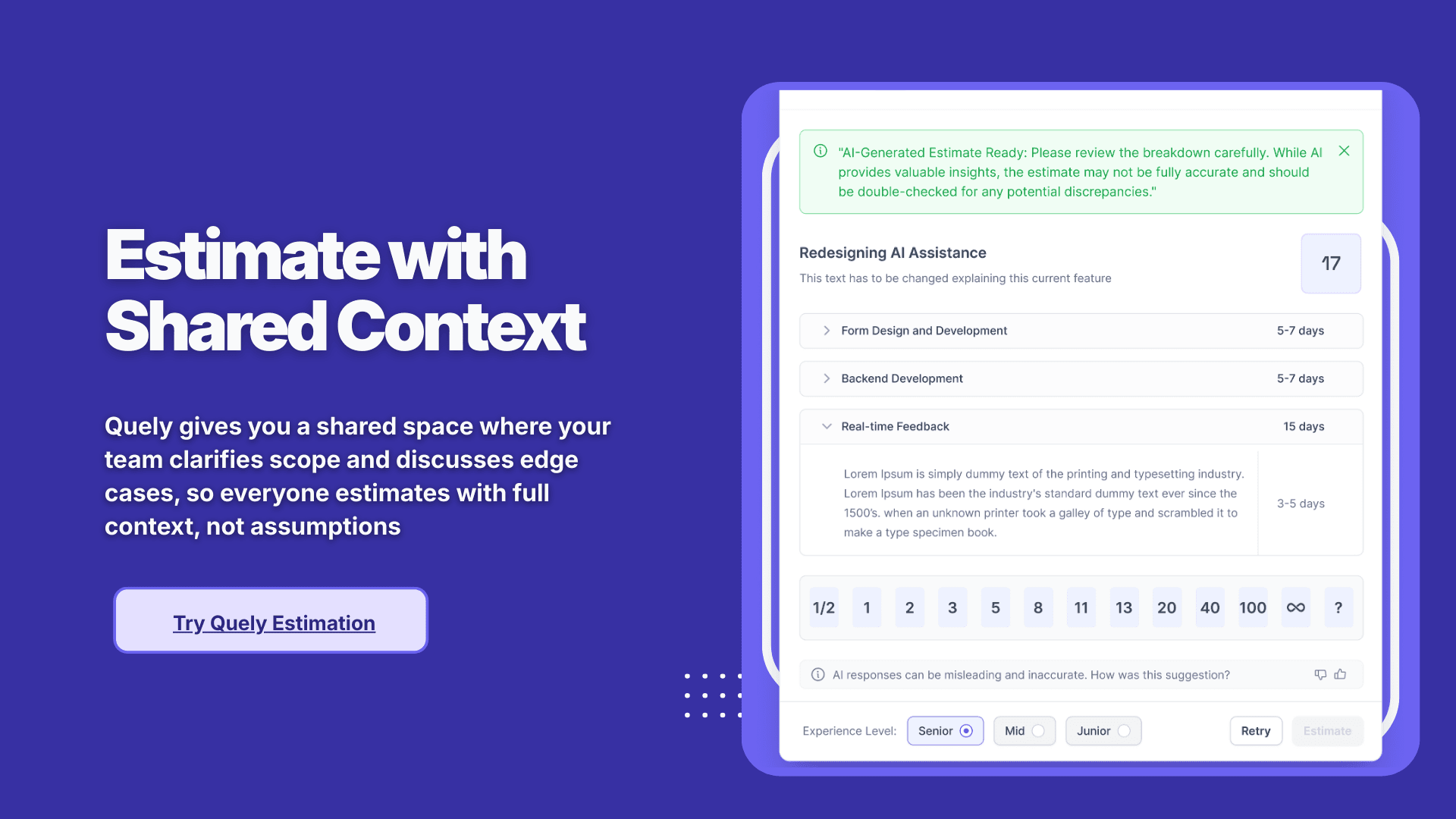
Top 7 Async Poker Tools for Remote & Distributed Teams
By The Quely Team — Quely editorial team
Planning Poker is beyond dropping numbers into a field. It’s a way for your team to discuss scope, identify unknowns, and align on the work before committing. That collaboration is tough when your team is in different time zones. If you try to force it, you’d have meetings in inconvenient times that exclude people, and reduce this activity to a silent voting with little shared understanding.
To prevent this, you need to make your planning poker asynchronous and also find async planning poker tools for remote or distributed teams. We’ve created a list of these tools and categorizes them into those that work with Jira as well as stand alone tools.
Quick picks: best async planning poker tools (2026)
If you’re comparing options and just want the shortlist, here are the best async planning poker tools based on your team's setup:
Best Jira-native async planning poker: Async Poker (DoAsync)
Best Jira poker with multiple estimation modes: Agile Poker (Appfire)
Best for connected context around estimation and planning: Quely
Best for teams that want rituals in one place (retro + poker): Parabol
Best lightweight/free option: Scrumpy
Best flexible, session-based poker tool: PlanningPoker.live
If you’re not sure what to choose yet, the next section breaks down the decision.
Choosing an Async Planning Poker Tool: Jira Plugins vs Standalone Tool
When it comes to estimating work asynchronously, you have two options:
Use a Jira plugin that brings planning poker directly into your Jira workflow.
Use a standalone tool that syncs with Jira but has its own platform.
The best option depends on how your team works. If you want to stay inside Jira and keep things simple, a plugin may be the way to go. If you prefer more flexibility, better UX, or additional integrations (to Slack, GitHub, or retrospectives), a standalone tools might be a better fit.
A Simple way to choose the right async planning poker tool
Most teams don’t need a “perfect” tool. What you need is a tool that's the right fit for how you already plan.
Choose a Jira plugin if:
your team uses Jira and you don't want to context switch
you want estimates written directly to Jira issues automatically
you want to get estimates in quickly” without redesigning your planning workflow
you’re rolling this out across a team/org and want everyone to adopt it easily
Choose a standalone tool if:
your priority is planning, not just collecting votes
your team wants a better experience than what Jira screens
you want async-first workflows (estimate + discuss + converge) without forcing everyone into the same meeting
you want a broader ritual suite (retros, facilitation, alignment) in one place
If you’re scaling planning poker across multiple teams:
prioritize tools that support:
admin controls and permissioning
reliable integrations (especially if you need Jira fields to stay clean)
estimation history (so you can revisit “why this was a 5” later)
async workflows that don’t collapse back into meetings
7 Best Async Poker Tools for Remote Teams
1. Async Poker by DoAsync: Async Poker is built for distributed teams that want to estimate without requiring everyone to participate at the same time. To use this tool, you create estimation “games” where each member can vote on story estimates independently and on their own schedule. Only issues with disparate votes require a follow-up discussion.
If you want to encourage your team to write their story description, this tool is one asynchronous poker planning tools that’d help you build that culture.
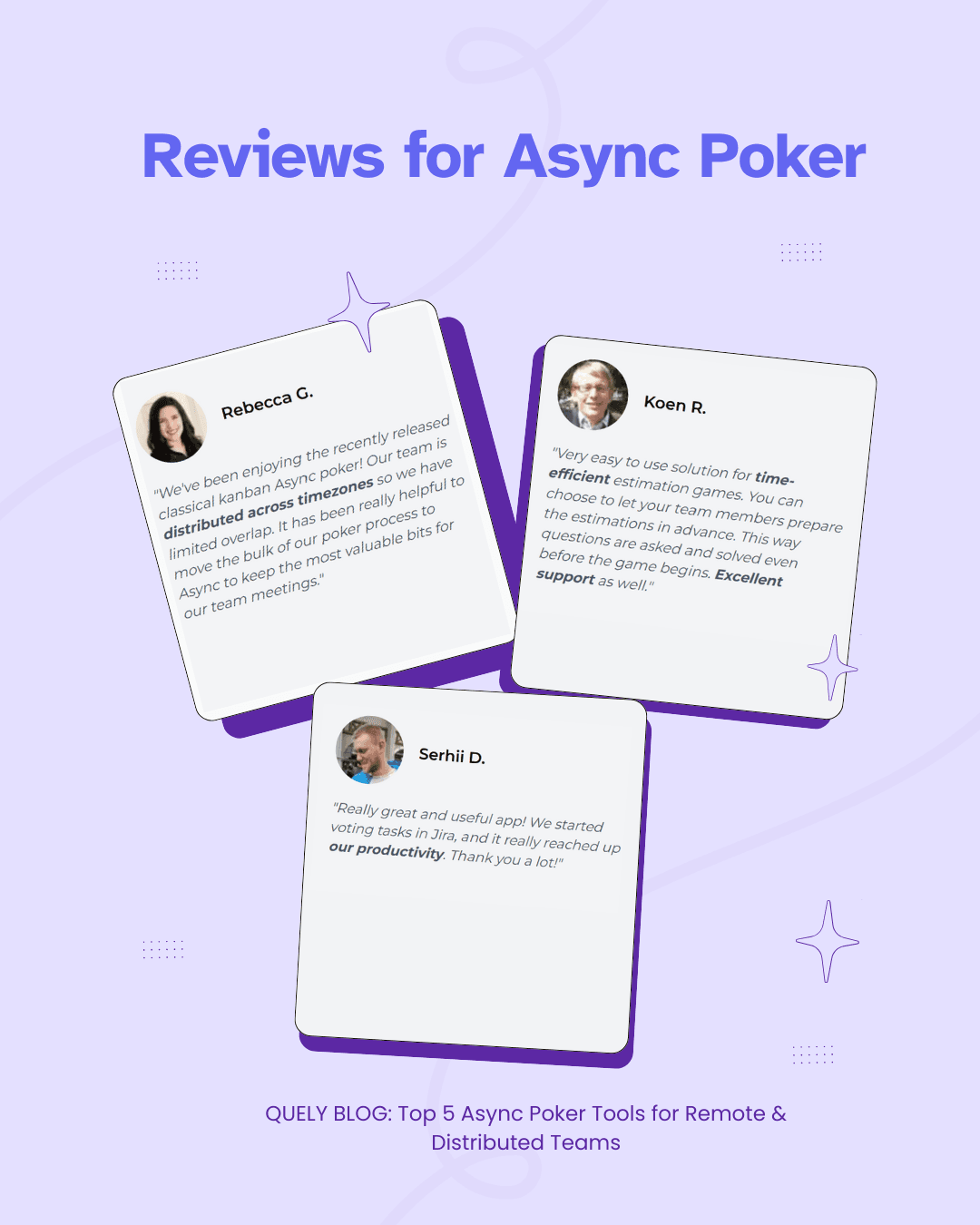
What Users Love:
Many users say that Async Poker is efficient and provides developer support.
They love that everyone can estimate “in their own time” and that only non-unanimous estimates trigger discussion, which helps they cut down unnecessary meeting time
They also say that the app is “constantly evolving” with new features and that the developers actively listen to feedback and implement features they request.
In general, most times liked the quick responsive support, incredibly fast fixes, and a good user experience.
Best for: Teams working across time zones who want easy estimation inside Jira.
Async Poker plan availability and Jira user tiers can change. Verify the current Cloud plans on the official Atlassian Marketplace listing.
Calculate current annual and monthly cost from your Jira user tier rather than relying on historical examples.
Large organizations should confirm current enterprise terms, procurement requirements, and hosting support with the vendor.
2. Agile Poker by Appfire: Agile Poker is one of the most widely used planning poker tools in the Jira ecosystem. A lot of teams use it to estimate issues in real-time or asynchronously within Jira. It pulls in story details and pushes back estimates into Jira. That way, you don’t have to use external sites or cards.
You can also choose from multiple estimation modes like Interactive (real-time planning poker), Asynchronous (Wideband Delphi style), Relative (Magic/affinity estimation), and even an AI-assisted mode, depending on what you need.
What users like:
Multiple estimation techniques in one: Most users love the flexibility of having different estimation methods to choose from. You can start with classic Planning Poker, switch to a Magic Estimation for fast backlog sizing, or let your team estimate asynchronously before a review. This flexibility means the app can adapt as your team’s estimation process evolves. Having options (including support for custom card decks, T-shirt sizes, Fibonacci, etc.) is a big plus for many Agile teams.
Jira-native convenience: Appfire is integrated into Jira. Most users like that this reduces switching between tools as estimations happen inside Jira Cloud or Data Center, and the results are saved to the issues automatically. Agile Poker’s UI fits well with Jira’s look and gives a sense of project status (it even offers velocity charts and a sprint capacity calculator in-app).
Remote planning effectiveness: Most remote teams using Agile Poker say that it has made their remote sprint planning easier and more engaging than other solutions like spreadsheets or chat voting, which they tried before. The real-time mode with reveal-after-vote ensures everyone votes independently without influence.
Users also like the discussion feature. After a round of voting, the app highlights the estimates (and can even show an AI-suggested estimate), prompting you to have a conversation on outliers.
What users dislike:
UI issues for certain tasks: Some users pointed out some usability issues. For example, one reviewer complained, “it is [a] very horrible experience when I try to filter the user stories by user [in Agile Poker]. And [I’m] not able to find the previous sprint user stories.”
Technical differentiators:
Multi-field estimation: Teams assign story points, T-shirt sizes, and priority scores simultaneously, with optional weighted final scores
Historical benchmarking: Compares current estimates against past similar tickets using Appfire AI, reducing anchoring bias.
Capacity analytics: Projects sprint velocity based on estimated effort and team availability, integrated with Jira’s native reporting.
Enterprise evaluation: Confirm the vendor’s current security documentation, deployment options, permission controls, audit features, and mobile usability against your organization’s requirements.
Pricing:
Agile Poker plan availability varies by hosting model and Jira tier. Verify current Cloud and Data Center eligibility on the official Atlassian Marketplace listing.
Cloud pricing is tied to Marketplace terms and Jira user tiers. Use the official listing to calculate current total cost for your site.
Data Center tiers and renewal terms differ from Cloud. Confirm current tier thresholds and annual cost on the official listing.
Compare total annual cost, hosting requirements, active Jira user count, and procurement terms rather than relying on an old per-user estimate.
Best for: hybrid teams that need multiple estimation modes and enterprise features.
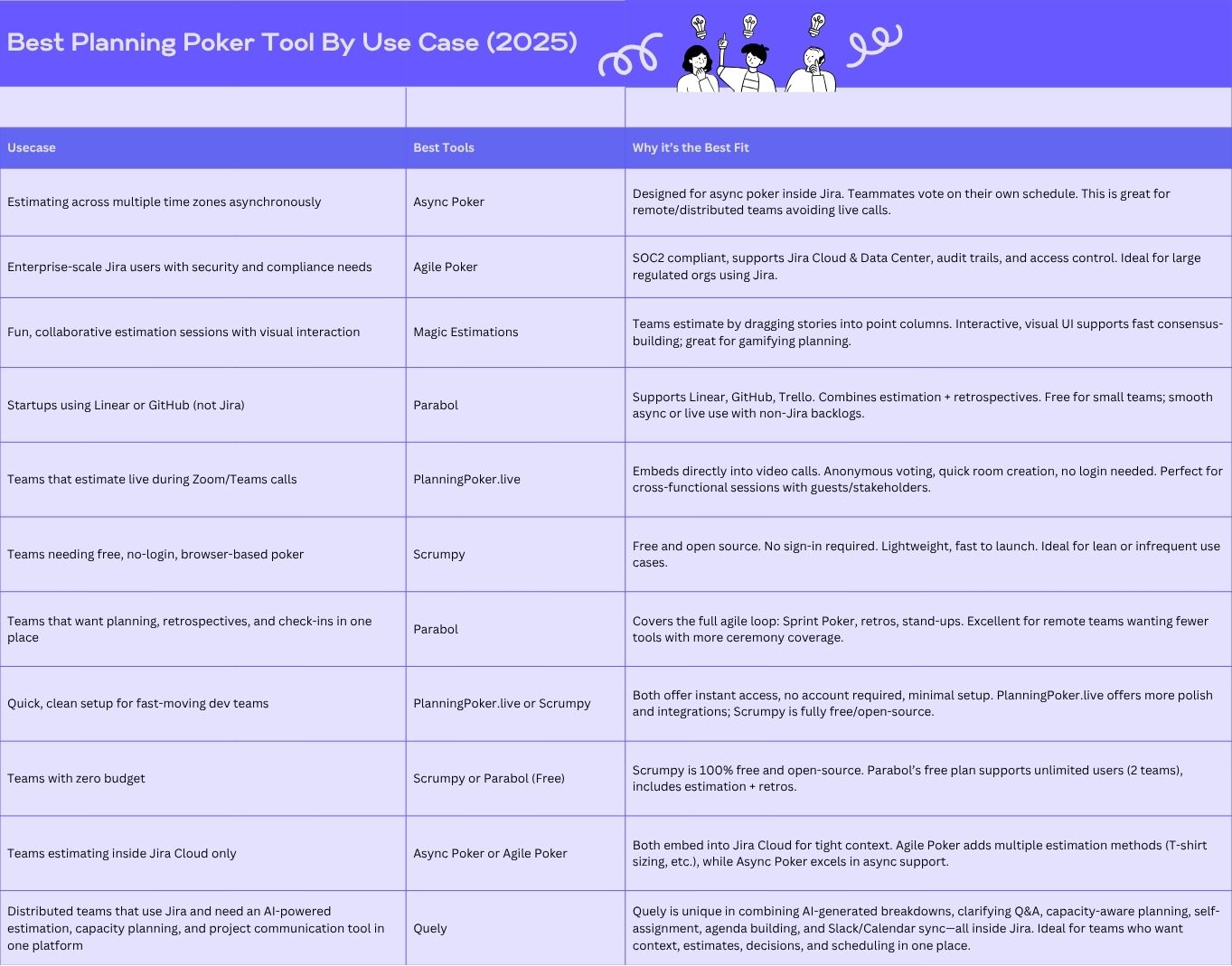
3. Magic Estimations by Magic Apps: Magic Estimations combines both Magic Estimation (Affinity Estimation) technique and Planning Poker. Most teams use Magic Estimations to quickly size a large number of backlog items. To use it, you lay out all user stories on a board and your team members silently drag and group them into size-based columns (or lanes). This gives you a relative estimate for dozens of items.
A lot of people use this for initial backlog estimation or quarterly planning, where speed is prioritized over deep discussion for each item. Because of this, most Users say that it is “super fast compared to alternatives” for getting a sense of story sizes. In the Atlassian Marketplace, one review says that with Magic Estimation, they “can estimate months’ worth of work in an hour.”
In addition to the Magic Estimation mode, the app also includes a Planning Poker mode and an Async Poker mode. So many teams use Magic Estimations as an all-in-one estimation app where they do quick relative sizing of the whole backlog with Magic Estimation, then later use the Planning Poker mode for sprint grooming of individual stories.
What users like:
Very fast backlog estimation: For most users, speed is the primary benefit of this tool. They have the option to estimate a large backlog in a fraction of the time a traditional story-by-story poker would take. By visually sorting items by relative size, as one user put it, the app makes it “much easier to make a sizing decision for a user story. Users who have to estimate many items love this visual approach. They find it more intuitive and efficient than calling out numbers for each item sequentially.
Simplicity and intuitiveness: A lot of users say the app is straightforward to use. You need little to no training to get started. If you can drag and drop cards on a board, you can use the app.
Multiple modes (flexibility): Users like that they can get Magic Estimation mode, Planning Poker and Async Poker in the same app. They can do both silent grouping estimations and interactive poker with one tool. Magic Apps also added features like built-in chat for discussion, a dark theme, and the ability to estimate any numeric field (not only story points) – addressing various user needs.
What users dislike:
Occasional technical hiccups: A few user comments alluded to minor “session hiccups” – for example, a refresh needed here or there, or a momentary sync issue when multiple people drag cards at the exact same time. These were infrequent and not catastrophic, but they did occur. Magic Apps has been updating the app to improve performance, but being a smaller vendor, their releases are not as frequent as Appfire’s. No user reported any data loss or major bug in 2024, just some rough edges that could be smoothed out.
Feature gaps vs. competitors: Magic Estimations is a free tool. So it doesn’t have some of the advanced features of a paid product. For example, it may not have deep analytics, AI suggestions, or deep Jira customizations that larger teams might want. Though there weren’t specific complaints about missing features in reviews, in direct comparisons, other products like Agile Poker offer more in-depth features (like multi-field estimation, capacity planning, etc.) In summary, this estimation tool covers the core estimation functions very well, but if you’re a power user, you might eventually want more.
4. Quely: Quely is an intelligence layer across the systems teams already use. In an estimation workflow, Jira issues and other execution objects become Work Units inside a Space, alongside the Context Units needed to understand the work.
Orbit reasons across those Units and surfaces questions, dependencies, risks, blockers, and assumptions as Signals. Teams can review that context asynchronously, while Ownership provides responsibility, current commitments, workload, and available-capacity context.
Why teams choose it:
Orbit surfaces questions, dependencies, risks, blockers, and assumptions from connected context.
Estimation remains a team-owned workflow around connected Work Units.
Jira can contribute Work Units and native properties as one connected source.
Ownership connects responsibility, commitments, workload, and available capacity to the work.
Best for: Agile teams that want estimation to be collaborative and smarter, not just faster.
5. Parabol: Many scrum teams use Parabol for both sprint retrospectives and planning poker (estimation) sessions. They run retrospective meetings in Parabol, where members add “cards” of feedback (good or bad) anonymously and then group and discuss them.
In Parabol, everyone goes through each user story one by one and can vote on story points simultaneously, which then syncs back into Jira, removing the need to manually update the story points in Jira.
Overall, Parabol serves as an all-in-one agile meeting tool: teams use it to facilitate retrospectives, estimation/planning poker, and even team check-ins, especially for remote or distributed teams.
What Users Like
Ease of use and inclusivity: Parabol’s top feature is its simplicity. Users also like that it supports anonymous input and simultaneous voting, which encourages quiet team members to contribute equally
Streamlined retrospectives and discussions: Parabol provides built-in meeting templates and a step-by-step flow that keeps retros focused. Many users like how it facilitates grouping similar feedback cards, voting on topics, and timing discussions so the team spends time on what matters most. This approach helps moderators focus only on important topics and link action items to discussion cards for context.
Integrated estimation with fun elements: For sprint poker, Parabol lets everyone vote on story points at once and reveals the results for consensus. Most users love that it can push the chosen estimate to Jira automatically, which saves time and reduces the incidence of errors. Another feature users love is the ability to add comments or reactions to each card and discuss outliers right within the app.
What Users Dislike
Despite high ratings, users have noted a few minor frustrations or missing features in Parabol:
Limited administrative controls in meetings: Facilitators cannot lock or freeze individual cards during the reflection phase, and the moderator may not be able to see who still has votes remaining. Verify current controls directly with the vendor because meeting-administration features change over time.
Notification and summary controls: By default, Parabol emails a meeting all participants a meeting summary. Some facilitators found this inconvenient. They wish there were an option to disable this. A G2 reviewer said, “It’s great that summaries are automatically generated, but unfortunately, I (as the facilitator) can’t specify that those summaries shouldn’t be sent to everyone”. Team members can individually opt out of emails, but the organizer cannot control it globally.
Feature limitations for advanced use cases: A few reviews mention that Parabol is not yet suitable for certain large-scale agile events or advanced needs. For example, one user said, “I would be great if we could use Parabol for the PI event as well, but that is not possible yet.”. Another user wished it had more template variety and customization (e.g., more retro formats out of the box). And while Parabol added a health-check feature and AI meeting summaries in its paid tier, some felt its customization was not flexible enough to tailor to their workflow.
Pricing
Verify Parabol’s current entry-plan limits, meeting types, integrations, and history retention on the official pricing page.
For paid use, confirm the current billing unit, workspace limits, history, templates, surveys, and AI features on the official pricing page.
Enterprise buyers should verify current security, administration, support, hosting, service-level, analytics, and Jira deployment options directly with Parabol.
6. Scrumpy Planning Poker: Scrumpy is a simple, browser-based tool for estimating story points during sprint planning. Teams can use it as a standalone app or integrate it with Jira. The typical workflow is straightforward: a team lead opens Scrumpy, imports the issues they want to estimate, and shares a link with the team. No login is required. Everyone on your team just clicks the link and starts voting in real-time. Once everyone votes, the facilitator reveals all the estimates at once, and the team discusses any big differences before settling on a final number. If you're using the Jira plugin, Scrumpy automatically updates the story points in Jira. The tool supports different estimation styles like Fibonacci numbers, T-shirt sizes, or custom scales. There's also an async mode where people can vote at their own pace, though it's pretty basic.
Because Scrumpy is extremely simple, most people use it in situations where they want a quick planning poker session with minimal setupup. For example, a small co-located team might project the Scrumpy session on a screen, or a remote team that wants to do async planning poker might all join the Scrumpy link shared in a Zoom/Teams call.
You have to note that the asynchronous planning poker is very basic. It doesn't have notifications or deadlines, or other features that make it easy for your team to vote asynchronously.
What Users Like
Simple and fast: No installation or signup needed. You can set up an estimation meeting in seconds, and anyone can join with a single click, even non-technical people or stakeholders. This low barrier to entry is a huge plus for small teams with tight schedules.
Completely free: The web app with full planning poker functionality costs nothing, making it ideal for teams with tight budgets. The Jira plugin is also very affordable if you want it. This means you can save significant money compared to other paid poker apps, especially if you don't need advanced capabilities.
Flexible voting options: Scrumpy supports multiple estimation modes like standard Fibonacci numbers, Powers of 2, T-shirt sizes, time-based estimates, or even custom scales.
Fun and engaging: Beyond functionality, Scrumpy includes quirky touches like funny image card designs and jokes on the cards. It also has a real-time chat feature and emoji reactions so team members can interact during sessions. These small details make what could be a dry meeting more light-hearted and fun.
Real-time effectiveness: For teams meeting together—in person or on video—Scrumpy works perfectly. All votes are revealed simultaneously, and everyone sees the results instantly. The minimalist interface with no confusing settings flattens the learning curve. Most people say that Scrumpy keeps the estimation process snappy and focused.
What Users Dislike
Weak async support: While Scrumpy allows async voting, it has no built-in deadline or reminder system. There are no notifications to prompt team members who haven't voted yet, and no way to close a session automatically. This makes Scrumpy poorly suited for distributed teams. Using it for async work is clunky compared to more advanced tools that have structure for async workflows.
Limited features: Scrumpy does planning poker and nothing else. It lacks extras like capacity planning, reporting and analytics, AI assistance, or multi-team coordination. Teams looking for velocity charts, workload distribution, automatic note generation, or confidence voting will find Scrumpy lacking. It also won't help with different estimation techniques like Wideband Delphi or magic estimation.
Doesn't scale well: As organizations grow, Scrumpy's minimal approach becomes a constraint. There's no user management, team administration, or persistent team tracking. Scrumpy sessions are essentially one-off rooms. With multiple teams and frequent sessions, there's no dashboard or overview to see all meetings for a certain team. Scrumpy is best for a single team or a small handful of teams—it doesn't work well for large enterprises.
Jira-focused integration: Scrumpy's integrations are limited to Atlassian tools (Jira and Confluence) and a few developer platforms like GitHub, GitLab, and Azure DevOps. If your organization uses something else for project tracking like Azure Boards or Trello, you won't get deep integration. This is a known trade-off since Scrumpy started as a Jira add-on.
Pricing
Verify Scrumpy’s current web-app limits and included integrations on the vendor’s official site.
For Jira integration, confirm the current Marketplace pricing tier and hosting compatibility before installation.
7. Planning Poker live: PlanningPoker.live is an estimation tool designed for remote and hybrid teams. You can run planning poker sessions directly inside video calls on Google Meet, Zoom, Microsoft Teams, or Webex using browser extensions. This means everyone stays on the call while a sidebar shows the voting interface no need to switch tabs or apps. Alternatively, you can use the standalone web app or Slack integration. To use this app for async poker, you create a room and share a link, and your team members join easily.
Planning PokerLive integrates with Jira and Linear, so you can import issues directly into the session. After your discusses and pick an estimate, the story points automatically save back to your project management tool with one click. Planning Poker Live supports both real-time voting (where everyone votes at the same time and results show instantly) and async mode (where people vote on their own schedule). This flexibility makes it convenient for teams across different time zones.
What Users Like
Easy to use and accurate estimates: Alot of users say that the interface is easy and straightforward, which helps them focus on discussion rather than finding their way around the tool. Votes are also clearly visualized with averages and consensus indicators. The app even shows a "happy robot" icon when everyone agrees on a number, which gives teams confidence in their estimates.
Seamless integrations: The biggest appeal is how well it works inside video meetings. The Jira and Linear integration is also excellent. You can pull in issues directly and push story points back instantly, eliminating manual copy-paste work that other tools require.
No barriers for participants: Anyone can join a session just by clicking a link. There’s no sign-up or payment required. Only the host needs an account. This makes it easy to invite product owners, designers, or other stakeholders without worrying about licensing costs.
Smart pricing model: The credit-based system appeals to many teams because you only pay for what you use. If your team does planning poker occasionally, you might spend almost nothing. Heavy users can switch to an unlimited plan. This is different from traditional per-user pricing and feels more fair to some users.
Good design and fun features: The UI is minimalist with thoughtful touches like dark mode, a "throw stuff" feature for virtual reactions, and the smiling robot when the team reaches consensus. One reviewer said, "Thanks to this app our meetings are even fun now!" It's rare to hear that about an estimation tool.
Smart features: Planning Poker Live includes anonymous voting to reduce bias, async mode for distributed teams, a PokerBot that generates AI summaries of meetings, and the ability to save and export session history for future reference.
Active developer support: The tool is open-source and the developer is engaged with the community. Users appreciate the quick improvements and direct communication. They say it feels like you're working with a team that actually listens.
What Users Dislike
Credit-based pricing can be confusing: While flexible, the pay-per-session model isn't typical. You have to monitor your credit balance and remember to top-up or switch to unlimited when running low. Some teams prefer simple, flat subscriptions. Procurement teams might also find this approach less straightforward than standard licensing.
Plan experience: Verify whether the current entry plan includes advertising or other presentation constraints before using it with stakeholders.
Estimation only: Planning Poker Live focuses solely on planning poker. It doesn't do retrospectives, task management, or other agile ceremonies. If you're looking for one tool to replace several, this won't do it. You'll still need separate tools for retros or capacity planning.
Newer product with security questions: As a smaller, newer vendor, some enterprise users have concerns about data security and compliance. While the company is GDPR compliant and ISO 27001 certified, the tool is cloud-only without SSO integration or self-hosted options. Large organizations with strict security requirements might see this as a limitation.
No self-hosted or offline option: If you need an on-premise solution for a closed network, Planning Poker Live won't work since it's a hosted web service. This isn't a common complaint, but it's a limitation for certain industries or setups.
Pricing
Planning Poker Live uses a unique credit-based system where only the person running the session pays. Everyone else joins for free. Here's how it works:
Free Starter Credits
Verify the current starter allowance, recurring credits, expiration rules, and advertising terms on the vendor’s pricing page.
Pay-Per-Use Bundles
If the vendor still offers session credits, compare the current bundles with your expected monthly estimation frequency:
Model cost for a team that estimates every other week
Model cost for a team that estimates weekly
Model cost and administration for several teams or frequent sessions
Confirm current credit expiration, advertising, refund, and transfer rules before choosing a usage-based plan.
Unlimited Subscription
For frequent use, verify whether the vendor currently offers unlimited sessions, shared administration, or pooled billing.
Which paid planning poker tools are worth it?
A lot of teams start with free planning poker tools and for small teams, that can be enough.
But paid tools are worth it when estimation is happening frequently, involving multiple stakeholders, or when your team is distributed and work async.
Paid planning poker tools are worth it if you need:
Jira-supported workflows (estimates written back to tickets automatically so you don't have to copy and paste)
async estimation windows (estimate over time, not during a single meeting)
reminders and nudges (so poker doesn’t stall)
outlier handling (discussion + revote flows that don’t turn into chaos)
traceability (estimate history and rationale, especially useful as your team scales)
Free tools are usually enough if:
you estimate occasionally
your team is small and can resolve outliers quickly
you don’t need deep integrations or admin controls
sprint planning is still mostly synchronous
If your team is running poker every sprint (or every week), the ROI usually shows up fast: less meeting time, fewer stalled estimates, and fewer debates later.
Conclusion
Estimation is a critical part of sprint planning but it often gets derailed by time zones and meetings that drag on.
For distributed teams, the important distinction is whether the problem is only collecting votes or understanding the work well enough to commit. Quely is designed for the second problem: it connects Work Units, Context Units, Signals, and Ownership so estimation can happen with the evidence surrounding the work.
Choose a dedicated voting product when you need only a lightweight estimation room. Choose Quely when risks, dependencies, decisions, workload, and cross-system context are the harder part of reaching a defensible estimate.
FAQs on the Best Planning Poker Tools 2026
What are the best planning poker tools in 2026?
The best option depends on the job you need done. Dedicated Jira apps suit teams that mainly need a voting workflow. Parabol is worth considering for a broader facilitation toolkit. Quely is the stronger fit when estimation depends on connected context, delivery Signals, and Ownership—not only the vote itself.
I’m comparing solutions for planning poker. What are the top options?
If you’re comparing planning poker tools, the fastest way to narrow the field is to start with your workflow. For those that use Jira, Jira plugins are often the simplest path because estimates can flow directly into the backlog without extra steps. However, if your bigger challenge is that you have too many meetings for sprint planning, then evaluate tools that support async estimation windows, written context, and discussion. Ultimately, the best options aren’t just “popular tools”. They’re the ones that match your workflow and make estimation easier to sustain week after week.
Which paid tools are worth it for planning poker?
Paid planning poker tools are usually worth it when estimation happens frequently and the cost of misalignment is high, especially across multiple engineers or squads. While free tools can work for small teams or occasional estimation, paid options tend to add the things that keep planning poker from breaking down over time: reliable integrations (particularly with Jira), better workflows for async estimation, reminders that prevent sessions from stalling, and clearer handling of disagreements when estimates don’t converge. In other words, you’re not paying for “voting cards”. You’re paying for consistency, less planning issues, and fewer follow-up conversations caused by missing context.
Need a reliable vendor for planning poker. Who should I talk to?
If you’re looking for a reliable vendor, it helps to think beyond the estimation session itself and focus on operational requirements like integration stability, admin controls, and support responsiveness. For example, Jira-plugin vendors can be a strong choice when you need clean issue-field syncing and a predictable rollout across teams. At the same time, if your organization is intentionally moving toward async work and wants estimation to happen without increasing meeting load, it’s worth talking to vendors that treat async planning as a workflow, not just a feature. Either way, the most reliable vendor is typically the one that fits your existing stack and can support adoption at scale without forcing your team into fragile workarounds.